

工具调用
为模型提供新的功能和数据访问权限,以便它们能够遵循指令并响应提示。
工具调用(也称为函数调用)为大模型提供了一种强大而灵活的方式来与外部系统接口并访问其训练数据之外的数据。本指南将展示如何将模型连接到应用程序提供的数据和操作。
ZenMux 支持多种 API 协议的工具调用:
- OpenAI Chat Completion API:使用
tools和tool_choice参数 - OpenAI Responses API:使用
tools参数,响应包含function_call类型 - Anthropic Messages API:使用
tools参数,工具定义使用input_schema - Google Vertex AI API:使用
FunctionDeclaration定义工具
OpenAI Chat Completion API
工作原理
让我们首先理解关于工具调用的几个关键术语。在我们对工具调用有了共同的词汇理解后,我们将通过一些实际示例来展示如何实现。
1. 工具(Tools) - 我们为模型提供的功能
工具是用来告诉模型它可以访问的一项功能。当模型生成对提示的响应时,它可能决定需要工具提供的数据或功能来遵循提示的指令。
你可以为模型提供以下工具的访问权限:
- 获取某个位置的今日天气
- 获取给定用户 ID 的账户详情
- 为丢失订单发放退款
或者任何其他你希望模型在响应提示时能够知道或执行的操作。
当我们向模型发出包含提示的 API 请求时,我们可以包含一个模型可能考虑使用的工具列表。例如,如果我们希望模型能够回答世界某个地方当前天气的问题,我们可能会给它访问一个 get_weather 工具,该工具以 location 作为参数。
2. 工具调用(Tool Call) - 模型使用工具的请求
函数调用或工具调用指的是我们从模型获得的一种特殊响应,当模型检查提示后,确定为了遵循提示中的指令,需要调用我们为其提供的工具之一。
如果模型在 API 请求中收到类似"巴黎的天气如何?"的提示,它可以响应一个对 get_weather 工具的工具调用,以 Paris 作为 location 参数。
3. 工具调用输出(Tool Call Output) - 我们为模型生成的输出
函数调用输出或工具调用输出指的是工具使用模型工具调用的输入生成的响应。工具调用输出可以是结构化的 JSON 或纯文本,并且应该包含对特定模型工具调用的引用(在后续示例中通过 tool_call_id 引用)。
完成我们的天气示例:
- 模型可以访问一个
get_weather工具,该工具以location作为参数。 - 响应类似"巴黎的天气如何?"的提示时,模型返回一个工具调用,包含值为
Paris的location参数 - 我们的工具调用输出可能是类似
{"temperature": "25", "unit": "C"}的 JSON 结构,表示当前温度为 25 度。
然后我们将所有工具定义、原始提示、模型的工具调用和工具调用输出一起发送回模型,最终收到如下文本响应:
巴黎今天的天气是 25°C。4. 函数工具(function)与工具(Tools)
- 函数(function)是一种特定类型的工具,由 JSON Schema 定义。函数定义允许模型向您的应用程序传递数据,您的代码可以访问数据或执行模型建议的操作。
- 除了函数工具外,还有自定义工具,它们可以处理自由文本输入和输出。
工具调用流程
工具调用是您的应用程序和模型通过 ZenMux API 进行的多轮对话。工具调用流程有五个主要步骤:
- 向模型发出请求,包含它可以调用的工具
- 从模型接收工具调用
- 在应用程序端使用工具调用的输入执行代码
- 向模型发出第二次请求,包含工具输出
- 从模型接收最终响应(或更多工具调用)
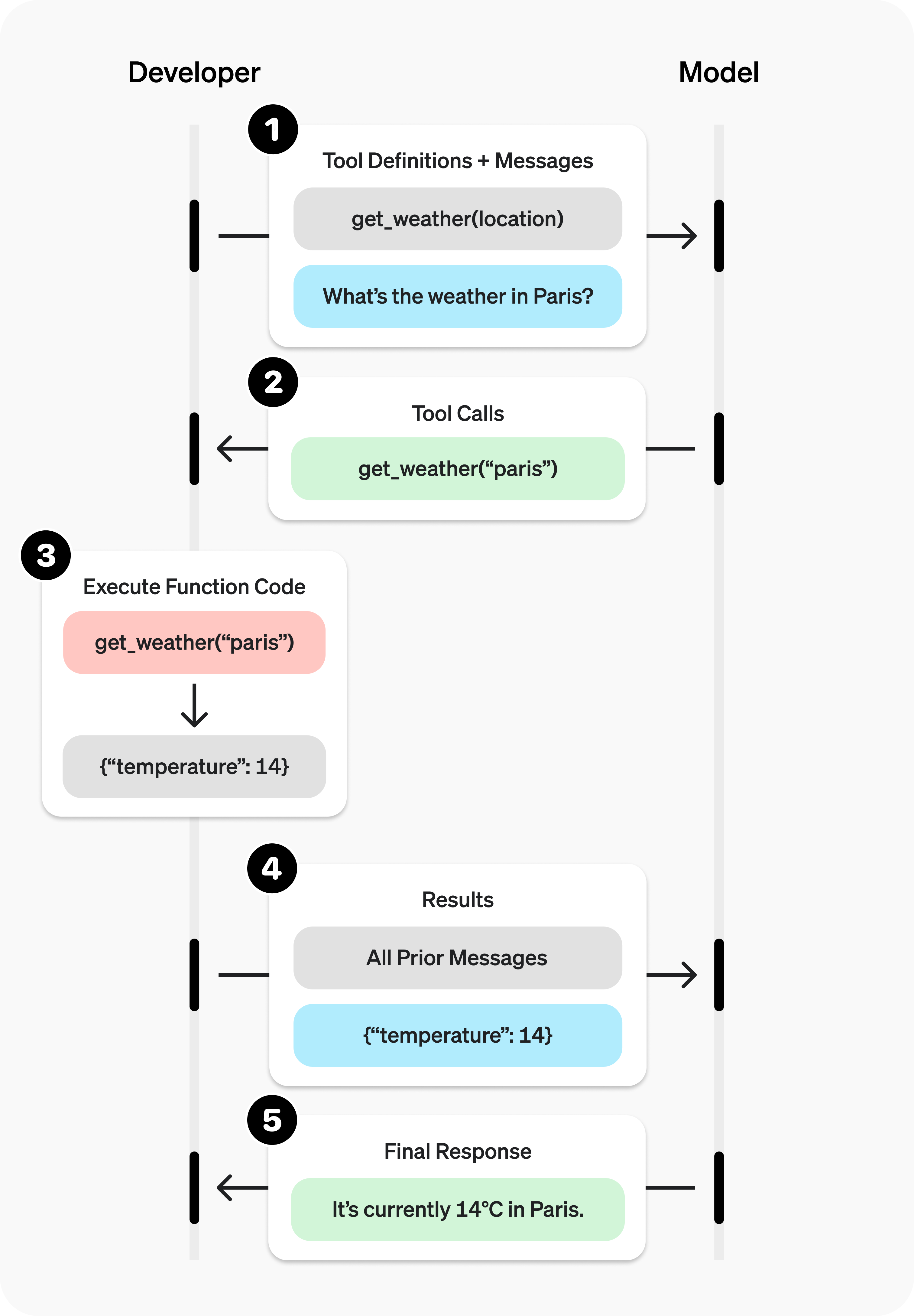
工具调用示例
让我们看一个完整的工具调用流程,使用 get_horoscope 获取星座的每日运势。
完整的工具调用示例:
from openai import OpenAI
import json

client = OpenAI(
  base_url="https://zenmux.ai/api/v1",
  api_key="<ZENMUX_API_KEY>",
)

# 1. 为模型定义可调用工具列表
tools = [
    {
        "type": "function",
        "function": {
            "name": "get_horoscope",
            "description": "获取某个星座的今日运势。",
            "parameters": {
                "type": "object",
                "properties": {
                    "sign": {
                        "type": "string",
                        "description": "星座名称,如金牛座或水瓶座",
                    },
                },
                "required": ["sign"],
            },
        },
    },
]

# 创建消息列表,我们将随时间添加消息到其中
input_list = [
    {"role": "user", "content": "我的运势如何?我是水瓶座。"}
]

# 2. 使用定义的工具提示模型
response = client.chat.completions.create(
    model="moonshotai/kimi-k2",
    tools=tools,
    messages=input_list,
)

# 保存函数调用输出以供后续请求使用
function_call = None
function_call_arguments = None
input_list.append({
  "role": "assistant",
  "content": response.choices[0].message.content,
  "tool_calls": [tool_call.model_dump() for tool_call in response.choices[0].message.tool_calls] if response.choices[0].message.tool_calls else None,
})

for item in response.choices[0].message.tool_calls:
    if item.type == "function":
        function_call = item
        function_call_arguments = json.loads(item.function.arguments)

def get_horoscope(sign):
    return f"{sign}:下周二你将结识一只小水獺。"

# 3. 执行 get_horoscope 的函数逻辑
result = {"horoscope": get_horoscope(function_call_arguments["sign"])}

# 4. 向模型提供函数调用结果
input_list.append({
    "role": "tool",
    "tool_call_id": function_call.id,
    "name": function_call.function.name,
    "content": json.dumps(result),
})

print("最终输入:")
print(json.dumps(input_list, indent=2, ensure_ascii=False))

response = client.chat.completions.create(
    model="moonshotai/kimi-k2",
    tools=tools,
    messages=input_list,
)

# 5. 模型现在应该能够给出响应!
print("最终输出:")
print(response.model_dump_json(indent=2))
print("\n" + response.choices[0].message.content)import OpenAI from "openai";
const openai = new OpenAI({
baseURL: 'https://zenmux.ai/api/v1',
apiKey: '<ZENMUX_API_KEY>',
});
// 1. 为模型定义可调用工具列表
const tools: OpenAI.Chat.Completions.ChatCompletionTool[] = [
{
type: "function",
function: {
name: "get_horoscope",
description: "获取某个星座的今日运势。",
parameters: {
type: "object",
properties: {
sign: {
type: "string",
description: "星座名称,如金牛座或水瓶座",
},
},
required: ["sign"],
},
},
},
];
// 创建消息列表,我们将随时间添加消息到其中
let input: OpenAI.Chat.Completions.ChatCompletionMessageParam[] = [
{ role: "user", content: "我的运势如何?我是水瓶座。" },
];
async function main() {
// 2. 使用有工具调用能力的模型
let response = await openai.chat.completions.create({
model: "moonshotai/kimi-k2",
tools,
messages: input,
});
// 保存函数调用输出以供后续请求使用
let functionCall: OpenAI.Chat.Completions.ChatCompletionMessageFunctionToolCall | undefined;
let functionCallArguments: Record<string, string> | undefined;
input = input.concat(response.choices.map((c) => c.message));
response.choices.forEach((item) => {
if (item.message.tool_calls && item.message.tool_calls.length > 0) {
functionCall = item.message.tool_calls[0] as OpenAI.Chat.Completions.ChatCompletionMessageFunctionToolCall;
functionCallArguments = JSON.parse(functionCall.function.arguments) as Record<string, string>;
}
});
// 3. 执行 get_horoscope 的函数逻辑
function getHoroscope(sign: string) {
return sign + " 下周二你将结识一只小水獺。";
}
if (!functionCall || !functionCallArguments) {
throw new Error("模型没有返回函数调用");
}
const result = { horoscope: getHoroscope(functionCallArguments.sign) };
// 4. 向模型提供函数调用结果
input.push({
role: 'tool',
tool_call_id: functionCall.id,
// @ts-expect-error must have name
name: functionCall.function.name,
content: JSON.stringify(result),
});
console.log("最终输入:");
console.log(JSON.stringify(input, null, 2));
response = await openai.chat.completions.create({
model: "moonshotai/kimi-k2",
tools,
messages: input,
});
// 5. 模型现在应该能够给出响应!
console.log("最终输出:");
console.log(JSON.stringify(response.choices.map(v => v.message), null, 2));
}
main();WARNING
注意,对于像 GPT-5 或 o4-mini 这样的推理模型,在最终输出的调用中,要将模型返回的工具调用内容连同工具调用输出一起传递给大模型进行总结输出。
定义函数工具(function)
函数工具可以在 tools 参数中设置。函数工具通过其 schema 定义,该 schema 告诉模型它的作用以及期望的输入参数。函数工具定义具有以下属性:
| 字段 | 描述 |
|---|---|
| type | 应该始终为 function |
| function | 工具结构体 |
| function.name | 函数名称(例如 get_weather) |
| function.description | 何时以及如何使用该函数的详细信息 |
| function.parameters | 定义函数输入参数的 JSON Schema |
| function.strict | 是否在生成函数调用时启用严格的模式遵循 |
以下是 get_weather 函数工具的定义
{
  "type": "function",
  "function": {
    "name": "get_weather",
    "description": "检索给定位置的当前天气。",
    "parameters": {
      "type": "object",
      "properties": {
        "location": {
          "type": "string",
          "description": "城市和国家,例如:波哥大、 哥伦比亚"
        },
        "units": {
          "type": "string",
          "enum": ["celsius", "fahrenheit"],
          "description": "返回温度的单位。"
        }
      },
      "required": ["location", "units"],
      "additionalProperties": false
    },
    "strict": true
  }
}
Token 使用
在底层,tools会计入模型的上下文限制,并作为 prompt token 计费。如果遇到 token 限制,我们建议限制tools大小和数量。
处理工具调用(Tool calling)
当模型调用tools的某个工具时,您必须执行这个工具并返回结果。由于工具调用可能包含零个、一个或多个调用,最佳实践是假设会调用多个。
响应格式
当模型需要调用工具时,响应的 finish_reason 为 "tool_calls",message 中包含 tool_calls 数组:
{
  "id": "chatcmpl_xxx",
  "model": "openai/gpt-4.1-nano",
  "choices": [
    {
      "index": 0,
      "message": {
        "role": "assistant",
        "content": null,
        "tool_calls": [
          {
            "id": "call_abc123",
            "type": "function",
            "function": {
              "name": "get_weather",
              "arguments": "{\"location\":\"北京\"}"
            }
          }
        ]
      },
      "finish_reason": "tool_calls"
    }
  ]
}
tool_calls 数组中每个调用包含以下字段:
id:用于后续提交函数结果的唯一标识符type: 是对应工具的type,一般是function或者customfunction: 函数结构体name:函数名称arguments:JSON 编码的函数参数
包含多个工具调用的 tool_calls 示例:
[
  {
    "id": "fc_12345xyz",
    "type": "function",
    "function": {
      "name": "get_weather",
      "arguments": "{\"location\":\"Paris, France\"}"
    }
  },
  {
    "id": "fc_67890abc",
    "type": "function",
    "function": {
      "name": "get_weather",
      "arguments": "{\"location\":\"Bogotá, Colombia\"}"
    }
  },
  {
    "id": "fc_99999def",
    "type": "function",
    "function": {
      "name": "send_email",
      "arguments": "{\"to\":\"[email protected]\",\"body\":\"Hi bob\"}"
    }
  }
]
执行工具调用并附加结果
for choice in response.choices:
    for tool_call in choice.message.tool_calls or []:
        if tool_call.type != "function":
            continue

        name = tool_call.function.name
        args = json.loads(tool_call.function.arguments)

        result = call_function(name, args)
        input_list.append({
            "role": "tool",
            "name": name,
            "tool_call_id": tool_call.id,
            "content": str(result)
})for (const choice of response.choices) {
for (const toolCall of choice.tool_calls) {
if (toolCall.type !== "function") {
continue;
}
const name = toolCall.function.name;
const args = JSON.parse(toolCall.function.arguments);
const result = callFunction(name, args);
input.push({
role: "tool",
name: name,
tool_call_id: toolCall.id,
content: result.toString()
});
}
}在上面的示例中,我们有一个假设的 callFunction 来路由每个调用。以下是可能的实现:
执行函数调用并附加结果
def call_function(name, args):
    if name == "get_weather":
        return get_weather(**args)
    if name == "send_email":
return send_email(**args)const callFunction = async (name: string, args: unknown) => {
if (name === "get_weather") {
return getWeather(args.latitude, args.longitude);
}
if (name === "send_email") {
return sendEmail(args.to, args.body);
}
};格式化结果
结果必须是字符串,字符串的内容可以自由定义(JSON、错误代码、纯文本等)。模型将根据需要解释该字符串。
如果您的工具调用没有返回值(例如 send_email),只需返回一个字符串来表示成功或失败。(例如 "success")
将结果合并到响应中
将结果附加到您的 input 后,您可以将它们发送回模型以获得最终响应。
将结果发送回模型
response = client.chat.completions.create(
    model="moonshotai/kimi-k2",
    messages=input_messages,
    tools=tools,
)const response = await openai.chat.completions.create({
model: "moonshotai/kimi-k2",
messages: input,
tools,
});最终响应
"巴黎约为 15°C,波哥大约为 18°C,我已经给 Bob 发送了那封邮件。"其他配置
调用工具行为控制(tool_choice)
默认情况下,模型将确定何时以及使用多少工具。您可以使用 tool_choice 参数来控制模型调用工具的行为。
- Auto:(默认)调用零个、一个或多个工具调用。
tool_choice: "auto" - Required: 调用一个或多个工具。
tool_choice: "required"
何时使用(allowed_tools)
如果您希望在模型请求中仅使用工具列表的子集,但不修改您传入的工具列表,以便最大化节省提示缓存,您可以配置 allowed_tools。
"tool_choice": {
    "type": "allowed_tools",
    "mode": "auto",
    "tools": [
        { "type": "function", "function": { "name": "get_weather" } },
        { "type": "function", "function": { "name": "get_time" } }
    ]
}
您也可以将 tool_choice 设置为 "none" 来强制模型不调用任何工具。
流式传输
流式工具调用与流式常规响应非常相似:您将 stream 设置为 true 并获得流式 event 列表。
流式工具调用:
from openai import OpenAI

client = OpenAI(
  base_url="https://zenmux.ai/api/v1",
  api_key="<ZENMUX_API_KEY>",
)

tools = [{
    "type": "function",
    "function": {
        "name": "get_weather",
        "description": "获取给定位置的当前温度。",
        "parameters": {
            "type": "object",
            "properties": {
                "location": {
                    "type": "string",
                    "description": "城市和国家,例如 波哥大, 哥伦比亚"
                }
            },
            "required": [
                "location"
            ],
            "additionalProperties": False
        }
    }
}]

stream = client.chat.completions.create(
    model="moonshotai/kimi-k2",
    messages=[{"role": "user", "content": "巴黎今天的天气怎么样?"}],
    tools=tools,
    stream=True
)

for event in stream:
print(event.choices[0].delta.model_dump_json())import { OpenAI } from "openai";
const openai = new OpenAI({
baseURL: 'https://zenmux.ai/api/v1',
apiKey: '<ZENMUX_API_KEY>',
});
const tools: OpenAI.Chat.Completions.ChatCompletionTool[] = [{
type: "function",
function: {
name: "get_weather",
description: "获取提供坐标的当前温度(摄氏度)。",
parameters: {
type: "object",
properties: {
latitude: { type: "number" },
longitude: { type: "number" }
},
required: ["latitude", "longitude"],
additionalProperties: false
},
strict: true,
},
}];
async function main() {
const stream = await openai.chat.completions.create({
model: "moonshotai/kimi-k2",
messages: [{ role: "user", content: "巴黎今天的天气怎么样?" }],
tools,
stream: true,
});
for await (const event of stream) {
console.log(JSON.stringify(event.choices[0].delta));
}
}
main()输出事件
{"content":"我需要","role":"assistant"}
{"content":"巴黎","role":"assistant"}
{"content":"的","role":"assistant"}
{"content":"坐标","role":"assistant"}
{"content":"才能","role":"assistant"}
{"content":"获取","role":"assistant"}
{"content":"天气","role":"assistant"}
{"content":"信息","role":"assistant"}
{"content":"。","role":"assistant"}
{"content":"巴黎","role":"assistant"}
{"content":"的","role":"assistant"}
{"content":"纬度","role":"assistant"}
{"content":"大约是","role":"assistant"}
{"content":"48","role":"assistant"}
{"content":".","role":"assistant"}
{"content":"856","role":"assistant"}
{"content":"6","role":"assistant"}
{"content":",","role":"assistant"}
{"content":"经","role":"assistant"}
{"content":"度","role":"assistant"}
{"content":"是","role":"assistant"}
{"content":"2","role":"assistant"}
{"content":".","role":"assistant"}
{"content":"352","role":"assistant"}
{"content":"2","role":"assistant"}
{"content":"。","role":"assistant"}
{"content":"让我","role":"assistant"}
{"content":"为您","role":"assistant"}
{"content":"查询","role":"assistant"}
{"content":"巴黎","role":"assistant"}
{"content":"今天的","role":"assistant"}
{"content":"天气","role":"assistant"}
{"content":"。","role":"assistant"}
{"content":"","role":"assistant","tool_calls":[{"index":0,"id":"get_weather:0","function":{"arguments":"","name":"get_weather"},"type":"function"}]}
{"content":"","role":"assistant","tool_calls":[{"index":0,"function":{"arguments":"{\""}}]}
{"content":"","role":"assistant","tool_calls":[{"index":0,"function":{"arguments":"latitude"}}]}
{"content":"","role":"assistant","tool_calls":[{"index":0,"function":{"arguments":"\":"}}]}
{"content":"","role":"assistant","tool_calls":[{"index":0,"function":{"arguments":" "}}]}
{"content":"","role":"assistant","tool_calls":[{"index":0,"function":{"arguments":"48"}}]}
{"content":"","role":"assistant","tool_calls":[{"index":0,"function":{"arguments":"."}}]}
{"content":"","role":"assistant","tool_calls":[{"index":0,"function":{"arguments":"856"}}]}
{"content":"","role":"assistant","tool_calls":[{"index":0,"function":{"arguments":"6"}}]}
{"content":"","role":"assistant","tool_calls":[{"index":0,"function":{"arguments":","}}]}
{"content":"","role":"assistant","tool_calls":[{"index":0,"function":{"arguments":" \""}}]}
{"content":"","role":"assistant","tool_calls":[{"index":0,"function":{"arguments":"longitude"}}]}
{"content":"","role":"assistant","tool_calls":[{"index":0,"function":{"arguments":"\":"}}]}
{"content":"","role":"assistant","tool_calls":[{"index":0,"function":{"arguments":" "}}]}
{"content":"","role":"assistant","tool_calls":[{"index":0,"function":{"arguments":"2"}}]}
{"content":"","role":"assistant","tool_calls":[{"index":0,"function":{"arguments":"."}}]}
{"content":"","role":"assistant","tool_calls":[{"index":0,"function":{"arguments":"352"}}]}
{"content":"","role":"assistant","tool_calls":[{"index":0,"function":{"arguments":"2"}}]}
{"content":"","role":"assistant","tool_calls":[{"index":0,"function":{"arguments":"}"}}]}
{"content":"","role":"assistant"}
当模型调用一个或多个工具时,将为每个工具调用输出一个 tool_calls.type 不为空的 event
{
  "content": "",
  "role": "assistant",
  "tool_calls": [
    {
      "index": 0,
      "id": "get_weather:0",
      "function": { "arguments": "", "name": "get_weather" },
      "type": "function"
    }
  ]
}
以下是一个代码片段,演示如何将 delta 聚合为最终的 tool_call 对象。
累积 tool_call 内容
final_tool_calls = {}

for event in stream:
    delta = event.choices[0].delta
    if delta.tool_calls and len(delta.tool_calls) > 0:
        tool_call = delta.tool_calls[0]
        if tool_call.type == "function":
            final_tool_calls[tool_call.index] = tool_call
        else:
            final_tool_calls[tool_call.index].function.arguments += tool_call.function.arguments

print("最终工具调用:")
for index, tool_call in final_tool_calls.items():
    print(f"Tool Call {index}:")
print(tool_call.model_dump_json(indent=2))const finalToolCalls: OpenAI.Chat.Completions.ChatCompletionMessageFunctionToolCall[] = [];
for await (const event of stream) {
const delta = event.choices[0].delta;
if (delta.tool_calls && delta.tool_calls.length > 0) {
const toolCall = delta.tool_calls[0] as OpenAI.Chat.Completions.ChatCompletionMessageFunctionToolCall & {index: number};
if (toolCall.type === "function") {
finalToolCalls[toolCall.index] = toolCall;
} else {
finalToolCalls[toolCall.index].function.arguments += toolCall.function.arguments;
}
}
}
console.log("最终工具调用:");
console.log(JSON.stringify(finalToolCalls, null, 2));累积的 final_tool_calls[0]
{
  "index": 0,
  "id": "get_weather:0",
  "function": {
    "arguments": "{\"location\": \"巴黎, 法国\"}",
    "name": "get_weather"
  },
  "type": "function"
}
OpenAI Responses API
OpenAI Responses API 提供了更现代化的工具调用接口,工具定义方式与 Chat Completion API 类似,但响应结构有所不同。
工具定义
Responses API 中的工具定义使用 tools 参数,支持函数工具、内置工具和 MCP 工具:
{
  "tools": [
    {
      "type": "function",
      "name": "get_weather",
      "description": "获取给定位置的当前天气",
      "parameters": {
        "type": "object",
        "properties": {
          "location": {
            "type": "string",
            "description": "城市名称,如 北京"
          }
        },
        "required": ["location"]
      }
    }
  ]
}
完整示例
from openai import OpenAI
import json

client = OpenAI(
    base_url="https://zenmux.ai/api/v1",
    api_key="<你的 ZENMUX_API_KEY>",
)

# 定义工具
tools = [
    {
        "type": "function",
        "name": "get_weather",
        "description": "获取给定位置的当前天气",
        "parameters": {
            "type": "object",
            "properties": {
                "location": {
                    "type": "string",
                    "description": "城市名称"
                }
            },
            "required": ["location"]
        }
    }
]

# 1. 发送请求
response = client.responses.create(
    model="openai/gpt-5",
    input="北京今天的天气怎么样?",
    tools=tools
)

# 2. 检查是否有工具调用
function_calls = []
for item in response.output:
    if item.type == "function_call":
        function_calls.append(item)

if function_calls:
    # 3. 执行工具调用
    def get_weather(location):
        return {"temperature": "25°C", "condition": "晴朗"}

    tool_outputs = []
    for call in function_calls:
        args = json.loads(call.arguments)
        result = get_weather(args["location"])
        tool_outputs.append({
            "type": "function_call_output",
            "call_id": call.call_id,
            "output": json.dumps(result, ensure_ascii=False)
        })

    # 4. 将工具结果发送回模型
    final_response = client.responses.create(
        model="openai/gpt-5",
        input=tool_outputs,
        previous_response_id=response.id
    )

    # 提取最终回答
    for item in final_response.output:
        if item.type == "message":
            for content in item.content:
                if content.type == "output_text":
print(content.text)import OpenAI from "openai";
const client = new OpenAI({
baseURL: "https://zenmux.ai/api/v1",
apiKey: "<你的 ZENMUX_API_KEY>",
});
// 定义工具
const tools = [
{
type: "function" as const,
name: "get_weather",
description: "获取给定位置的当前天气",
parameters: {
type: "object",
properties: {
location: {
type: "string",
description: "城市名称",
},
},
required: ["location"],
},
},
];
async function main() {
// 1. 发送请求
const response = await client.responses.create({
model: "openai/gpt-5",
input: "北京今天的天气怎么样?",
tools,
});
// 2. 检查是否有工具调用
const functionCalls = response.output.filter(
(item) => item.type === "function_call",
);
if (functionCalls.length > 0) {
// 3. 执行工具调用
function getWeather(location: string) {
return { temperature: "25°C", condition: "晴朗" };
}
const toolOutputs = functionCalls.map((call) => ({
type: "function_call_output" as const,
call_id: call.call_id,
output: JSON.stringify(getWeather(JSON.parse(call.arguments).location)),
}));
// 4. 将工具结果发送回模型
const finalResponse = await client.responses.create({
model: "openai/gpt-5",
input: toolOutputs,
previous_response_id: response.id,
});
// 提取最终回答
for (const item of finalResponse.output) {
if (item.type === "message") {
for (const content of item.content) {
if (content.type === "output_text") {
console.log(content.text);
}
}
}
}
}
}
main();# 1. 第一次请求 - 发送工具定义
curl https://zenmux.ai/api/v1/responses \
-H "Content-Type: application/json" \
-H "Authorization: Bearer $ZENMUX_API_KEY" \
-d '{
"model": "openai/gpt-5",
"input": "北京今天的天气怎么样?",
"tools": [
{
"type": "function",
"name": "get_weather",
"description": "获取给定位置的当前天气",
"parameters": {
"type": "object",
"properties": {
"location": {
"type": "string",
"description": "城市名称"
}
},
"required": ["location"]
}
}
]
}'
# 2. 第二次请求 - 发送工具执行结果(使用上一步返回的 response id)
curl https://zenmux.ai/api/v1/responses \
-H "Content-Type: application/json" \
-H "Authorization: Bearer $ZENMUX_API_KEY" \
-d '{
"model": "openai/gpt-5",
"input": [
{
"type": "function_call_output",
"call_id": "call_xxx",
"output": "{\"temperature\": \"25°C\", \"condition\": \"晴朗\"}"
}
],
"previous_response_id": "resp_xxx"
}'响应格式
当模型需要调用工具时,响应的 output 数组会包含 function_call 类型的内容:
{
  "id": "resp_xxx",
  "output": [
    {
      "type": "function_call",
      "call_id": "call_abc123",
      "name": "get_weather",
      "arguments": "{\"location\": \"北京\"}"
    }
  ]
}
tool_choice 参数
与 Chat Completion API 类似,Responses API 也支持 tool_choice 参数:
"auto":(默认)模型自动决定是否调用工具"required":强制模型调用至少一个工具"none":禁止调用工具{"type": "function", "name": "xxx"}:强制调用指定工具
Anthropic Messages API
Anthropic Claude 模型通过 tools 参数支持工具调用功能。工具定义使用 input_schema 字段而非 parameters。
工具定义
Anthropic 的工具定义格式:
{
  "tools": [
    {
      "name": "get_weather",
      "description": "获取给定位置的当前天气",
      "input_schema": {
        "type": "object",
        "properties": {
          "location": {
            "type": "string",
            "description": "城市名称,如 北京"
          }
        },
        "required": ["location"]
      }
    }
  ]
}
严格模式
Anthropic 支持 strict: true 参数启用严格模式,确保工具调用参数始终符合 schema 定义。
完整示例
import anthropic
import json

client = anthropic.Anthropic(
    api_key="<你的 ZENMUX_API_KEY>",
    base_url="https://zenmux.ai/api/anthropic"
)

# 定义工具
tools = [
    {
        "name": "get_weather",
        "description": "获取给定位置的当前天气。用户询问天气时调用此工具。",
        "input_schema": {
            "type": "object",
            "properties": {
                "location": {
                    "type": "string",
                    "description": "城市名称,如 北京、上海"
                }
            },
            "required": ["location"]
        }
    }
]

# 1. 发送请求
message = client.messages.create(
    model="anthropic/claude-sonnet-4.5",
    max_tokens=1024,
    tools=tools,
    messages=[
        {"role": "user", "content": "北京今天的天气怎么样?"}
    ]
)

# 2. 检查是否需要工具调用
if message.stop_reason == "tool_use":
    # 提取工具调用
    tool_use_block = None
    for block in message.content:
        if block.type == "tool_use":
            tool_use_block = block
            break

    if tool_use_block:
        # 3. 执行工具调用
        def get_weather(location):
            return {"temperature": "25°C", "condition": "晴朗", "humidity": "40%"}

        result = get_weather(tool_use_block.input["location"])

        # 4. 将工具结果发送回模型
        final_message = client.messages.create(
            model="anthropic/claude-sonnet-4.5",
            max_tokens=1024,
            tools=tools,
            messages=[
                {"role": "user", "content": "北京今天的天气怎么样?"},
                {"role": "assistant", "content": message.content},
                {
                    "role": "user",
                    "content": [
                        {
                            "type": "tool_result",
                            "tool_use_id": tool_use_block.id,
                            "content": json.dumps(result, ensure_ascii=False)
                        }
                    ]
                }
            ]
        )

        # 提取最终回答
        for block in final_message.content:
            if hasattr(block, "text"):
                print(block.text)
else:
    # 直接输出回答
    for block in message.content:
        if hasattr(block, "text"):
print(block.text)import Anthropic from "@anthropic-ai/sdk";
const client = new Anthropic({
apiKey: "<你的 ZENMUX_API_KEY>",
baseURL: "https://zenmux.ai/api/anthropic",
});
// 定义工具
const tools: Anthropic.Messages.Tool[] = [
{
name: "get_weather",
description: "获取给定位置的当前天气。用户询问天气时调用此工具。",
input_schema: {
type: "object" as const,
properties: {
location: {
type: "string",
description: "城市名称,如 北京、上海",
},
},
required: ["location"],
},
},
];
async function main() {
// 1. 发送请求
const message = await client.messages.create({
model: "anthropic/claude-sonnet-4.5",
max_tokens: 1024,
tools,
messages: [{ role: "user", content: "北京今天的天气怎么样?" }],
});
// 2. 检查是否需要工具调用
if (message.stop_reason === "tool_use") {
const toolUseBlock = message.content.find(
(block) => block.type === "tool_use",
);
if (toolUseBlock && toolUseBlock.type === "tool_use") {
// 3. 执行工具调用
function getWeather(location: string) {
return { temperature: "25°C", condition: "晴朗", humidity: "40%" };
}
const result = getWeather((toolUseBlock.input as any).location);
// 4. 将工具结果发送回模型
const finalMessage = await client.messages.create({
model: "anthropic/claude-sonnet-4.5",
max_tokens: 1024,
tools,
messages: [
{ role: "user", content: "北京今天的天气怎么样?" },
{ role: "assistant", content: message.content },
{
role: "user",
content: [
{
type: "tool_result",
tool_use_id: toolUseBlock.id,
content: JSON.stringify(result),
},
],
},
],
});
// 提取最终回答
for (const block of finalMessage.content) {
if (block.type === "text") {
console.log(block.text);
}
}
}
} else {
// 直接输出回答
for (const block of message.content) {
if (block.type === "text") {
console.log(block.text);
}
}
}
}
main();# 1. 第一次请求 - 发送工具定义
curl https://zenmux.ai/api/anthropic/v1/messages \
-H "x-api-key: $ZENMUX_API_KEY" \
-H "anthropic-version: 2023-06-01" \
-H "Content-Type: application/json" \
-d '{
"model": "anthropic/claude-sonnet-4.5",
"max_tokens": 1024,
"tools": [
{
"name": "get_weather",
"description": "获取给定位置的当前天气",
"input_schema": {
"type": "object",
"properties": {
"location": {
"type": "string",
"description": "城市名称"
}
},
"required": ["location"]
}
}
],
"messages": [
{"role": "user", "content": "北京今天的天气怎么样?"}
]
}'
# 2. 第二次请求 - 发送工具执行结果
curl https://zenmux.ai/api/anthropic/v1/messages \
-H "x-api-key: $ZENMUX_API_KEY" \
-H "anthropic-version: 2023-06-01" \
-H "Content-Type: application/json" \
-d '{
"model": "anthropic/claude-sonnet-4.5",
"max_tokens": 1024,
"tools": [
{
"name": "get_weather",
"description": "获取给定位置的当前天气",
"input_schema": {
"type": "object",
"properties": {
"location": {"type": "string", "description": "城市名称"}
},
"required": ["location"]
}
}
],
"messages": [
{"role": "user", "content": "北京今天的天气怎么样?"},
{
"role": "assistant",
"content": [
{
"type": "tool_use",
"id": "toolu_xxx",
"name": "get_weather",
"input": {"location": "北京"}
}
]
},
{
"role": "user",
"content": [
{
"type": "tool_result",
"tool_use_id": "toolu_xxx",
"content": "{\"temperature\": \"25°C\", \"condition\": \"晴朗\"}"
}
]
}
]
}'响应格式
当 Claude 需要调用工具时,响应的 stop_reason 为 "tool_use",content 数组包含 tool_use 类型的内容块:
{
  "id": "msg_abc123",
  "model": "anthropic/claude-sonnet-4.5",
  "stop_reason": "tool_use",
  "content": [
    {
      "type": "tool_use",
      "id": "toolu_abc123",
      "name": "get_weather",
      "input": {
        "location": "北京"
      }
    }
  ]
}
TIP
Claude 可能在工具调用之前返回一个 text 块(如 "让我查看一下天气"),也可能直接返回 tool_use 块,取决于模型的判断。
tool_choice 参数
Anthropic 的 tool_choice 参数支持以下值:
| 值 | 说明 |
|---|---|
{"type": "auto"} | (默认)模型自动决定是否调用工具 |
{"type": "any"} | 强制模型调用至少一个工具 |
{"type": "tool", "name": "xxx"} | 强制调用指定名称的工具 |
{"type": "none"} | 禁止调用工具 |
并行工具调用
Claude 支持在单次响应中返回多个工具调用:
{
  "content": [
    {
      "type": "tool_use",
      "id": "toolu_1",
      "name": "get_weather",
      "input": { "location": "北京" }
    },
    {
      "type": "tool_use",
      "id": "toolu_2",
      "name": "get_weather",
      "input": { "location": "上海" }
    }
  ]
}
返回结果时需要为每个工具调用提供对应的 tool_result:
{
  "role": "user",
  "content": [
    {
      "type": "tool_result",
      "tool_use_id": "toolu_1",
      "content": "{\"temperature\": \"25°C\"}"
    },
    {
      "type": "tool_result",
      "tool_use_id": "toolu_2",
      "content": "{\"temperature\": \"28°C\"}"
    }
  ]
}
Google Vertex AI API
Google Vertex AI 的 Gemini 模型通过 tools 参数支持函数调用(Function Calling)。
工具定义
Vertex AI 使用 FunctionDeclaration 定义工具:
from google.genai import types

tools = types.Tool(
    function_declarations=[
        types.FunctionDeclaration(
            name="get_weather",
            description="获取给定位置的当前天气",
            parameters={
                "type": "object",
                "properties": {
                    "location": {
                        "type": "string",
                        "description": "城市名称"
                    }
                },
                "required": ["location"]
            }
        )
    ]
)
完整示例
from google import genai
from google.genai import types
import json

client = genai.Client(
    api_key="<你的 ZENMUX_API_KEY>",
    vertexai=True,
    http_options=types.HttpOptions(
        api_version='v1',
        base_url='https://zenmux.ai/api/vertex-ai'
    ),
)

# 定义工具
get_weather_func = types.FunctionDeclaration(
    name="get_weather",
    description="获取给定位置的当前天气。用户询问天气时调用此工具。",
    parameters={
        "type": "object",
        "properties": {
            "location": {
                "type": "string",
                "description": "城市名称,如 北京、上海"
            }
        },
        "required": ["location"]
    }
)

tools = types.Tool(function_declarations=[get_weather_func])

# 1. 发送请求
response = client.models.generate_content(
    model="google/gemini-2.5-pro",
    contents="北京今天的天气怎么样?",
    config=types.GenerateContentConfig(
        tools=[tools]
    )
)

# 2. 检查是否有函数调用
if response.function_calls:
    function_call = response.function_calls[0]

    # 3. 执行函数调用
    def get_weather(location):
        return {"temperature": "25°C", "condition": "晴朗", "humidity": "40%"}

    result = get_weather(function_call.args["location"])

    # 4. 构建包含函数结果的对话历史
    contents = [
        types.Content(role="user", parts=[types.Part(text="北京今天的天气怎么样?")]),
        response.candidates[0].content,  # 模型的函数调用响应
        types.Content(
            role="user",
            parts=[
                types.Part.from_function_response(
                    name=function_call.name,
                    response=result
                )
            ]
        )
    ]

    # 5. 发送最终请求
    final_response = client.models.generate_content(
        model="google/gemini-2.5-pro",
        contents=contents,
        config=types.GenerateContentConfig(
            tools=[tools]
        )
    )

    print(final_response.text)
else:
print(response.text)import { GoogleGenAI } from "@google/genai";
const client = new GoogleGenAI({
apiKey: "<你的 ZENMUX_API_KEY>",
vertexai: true,
httpOptions: {
baseUrl: "https://zenmux.ai/api/vertex-ai",
apiVersion: "v1",
},
});
// 定义工具
const tools = {
functionDeclarations: [
{
name: "get_weather",
description: "获取给定位置的当前天气",
parameters: {
type: "object",
properties: {
location: {
type: "string",
description: "城市名称",
},
},
required: ["location"],
},
},
],
};
async function main() {
// 1. 发送请求
const response = await client.models.generateContent({
model: "google/gemini-2.5-pro",
contents: "北京今天的天气怎么样?",
generationConfig: {
tools: [tools],
},
});
// 2. 检查是否有函数调用
const functionCalls = response.functionCalls;
if (functionCalls && functionCalls.length > 0) {
const call = functionCalls[0];
// 3. 执行函数调用
function getWeather(location: string) {
return { temperature: "25°C", condition: "晴朗", humidity: "40%" };
}
const result = getWeather(call.args.location);
// 4. 构建包含函数结果的对话历史并发送
const finalResponse = await client.models.generateContent({
model: "google/gemini-2.5-pro",
contents: [
{ role: "user", parts: [{ text: "北京今天的天气怎么样?" }] },
response.candidates[0].content,
{
role: "user",
parts: [
{
functionResponse: {
name: call.name,
response: result,
},
},
],
},
],
generationConfig: {
tools: [tools],
},
});
console.log(finalResponse.text);
} else {
console.log(response.text);
}
}
main();响应格式
当 Gemini 需要调用函数时,响应会包含 functionCall 部分:
{
  "candidates": [
    {
      "content": {
        "role": "model",
        "parts": [
          {
            "functionCall": {
              "name": "get_weather",
              "args": {
                "location": "北京"
              }
            }
          }
        ]
      }
    }
  ]
}
函数调用模式
Vertex AI 支持通过 functionCallingConfig 控制函数调用行为:
| 模式 | 说明 |
|---|---|
AUTO | (默认)模型自动决定是返回文本还是调用函数 |
ANY | 强制模型调用函数,可通过 allowed_function_names 限制可调用的函数 |
NONE | 禁止函数调用 |
VALIDATED | (预览)确保函数调用参数符合 schema |
config = types.GenerateContentConfig(
    tools=[tools],
    tool_config=types.ToolConfig(
        function_calling_config=types.FunctionCallingConfig(
            mode=types.FunctionCallingConfigMode.ANY,
            allowed_function_names=["get_weather"]
        )
    )
)
并行函数调用
Gemini 支持在单次响应中返回多个函数调用:
{
  "candidates": [
    {
      "content": {
        "parts": [
          {
            "functionCall": {
              "name": "get_weather",
              "args": { "location": "北京" }
            }
          },
          {
            "functionCall": {
              "name": "get_weather",
              "args": { "location": "上海" }
            }
          }
        ]
      }
    }
  ]
}
返回结果时需要将所有函数响应一起发送:
contents.append(
    types.Content(
        role="user",
        parts=[
            types.Part.from_function_response(name="get_weather", response=result1),
            types.Part.from_function_response(name="get_weather", response=result2)
        ]
    )
)
协议对比
| 特性 | Chat Completion | Responses API | Anthropic Messages | Vertex AI |
|---|---|---|---|---|
| 工具参数名 | tools | tools | tools | tools |
| Schema 字段 | parameters | parameters | input_schema | parameters |
| 工具调用标识 | tool_calls | function_call | tool_use | functionCall |
| 结果字段 | tool role | function_call_output | tool_result | functionResponse |
| 并行调用 | ✅ | ✅ | ✅ | ✅ |
| 强制调用 | tool_choice | tool_choice | tool_choice | functionCallingConfig |
| 严格模式 | strict: true | ✅ | strict: true | VALIDATED 模式 |
| 流式支持 | ✅ | ✅ | ✅ | ✅ |