

Model Aliases
ZenMux now ships a model alias feature. Coding Agents such as Claude Code and Codex can be pointed at ZenMux without separately mapping model names — the alias makes each ZenMux model answer to the exact id that the downstream tool expects.
What It Means for You
Using Claude Code as an example:
- No more manual model-id rewriting. You no longer have to write
anthropic/claude-sonnet-4.6just to satisfy Claude Code. - Effort control works. Budget control and reasoning-intensity knobs (
effort) take effect normally. - No extra mapping layer. You don't have to maintain a model-name translation table in the downstream tool.
Why This Mattered Before
Claude Code gates certain features on a hardcoded check against the model name. Take reasoning effort control: the trigger is detecting a model named claude-sonnet-4-6. When ZenMux previously exposed the same model as anthropic/claude-sonnet-4.6, the string didn't match, and the feature silently turned off.
The same thing happens with the 1M context window — if the name isn't what Claude Code expects, the extended window never activates and you fall back to the default 200K tokens.
How Aliases Fix It
The alias makes claude-sonnet-4-6 fully equivalent to anthropic/claude-sonnet-4.6. Claude Code's validator sees the string it wants, the check passes, and effort / 1M context / everything else works as designed.
Commonly used aliases for the official Claude family:
| Alias | Full ZenMux Model ID |
|---|---|
claude-opus-4-7 | anthropic/claude-opus-4.7 |
claude-sonnet-4-6 | anthropic/claude-sonnet-4.6 |
claude-haiku-4-5 | anthropic/claude-haiku-4.5 |
💡 Rule of Thumb
- Using a native Claude model inside Claude Code (or another Claude-native Coding Agent): no need to set a model name at all — Claude Code's defaults already use aliases that match ZenMux.
- Using a non-native model inside the same tool (e.g.,
gpt-5.3-codexinside Claude Code): you still have to set the full ZenMux model id manually, since there is no alias that the tool recognizes out of the box.
How to Look Up an Alias
Every model's detail page on ZenMux lists the aliases it currently supports. Open the model page and check the Aliases section:
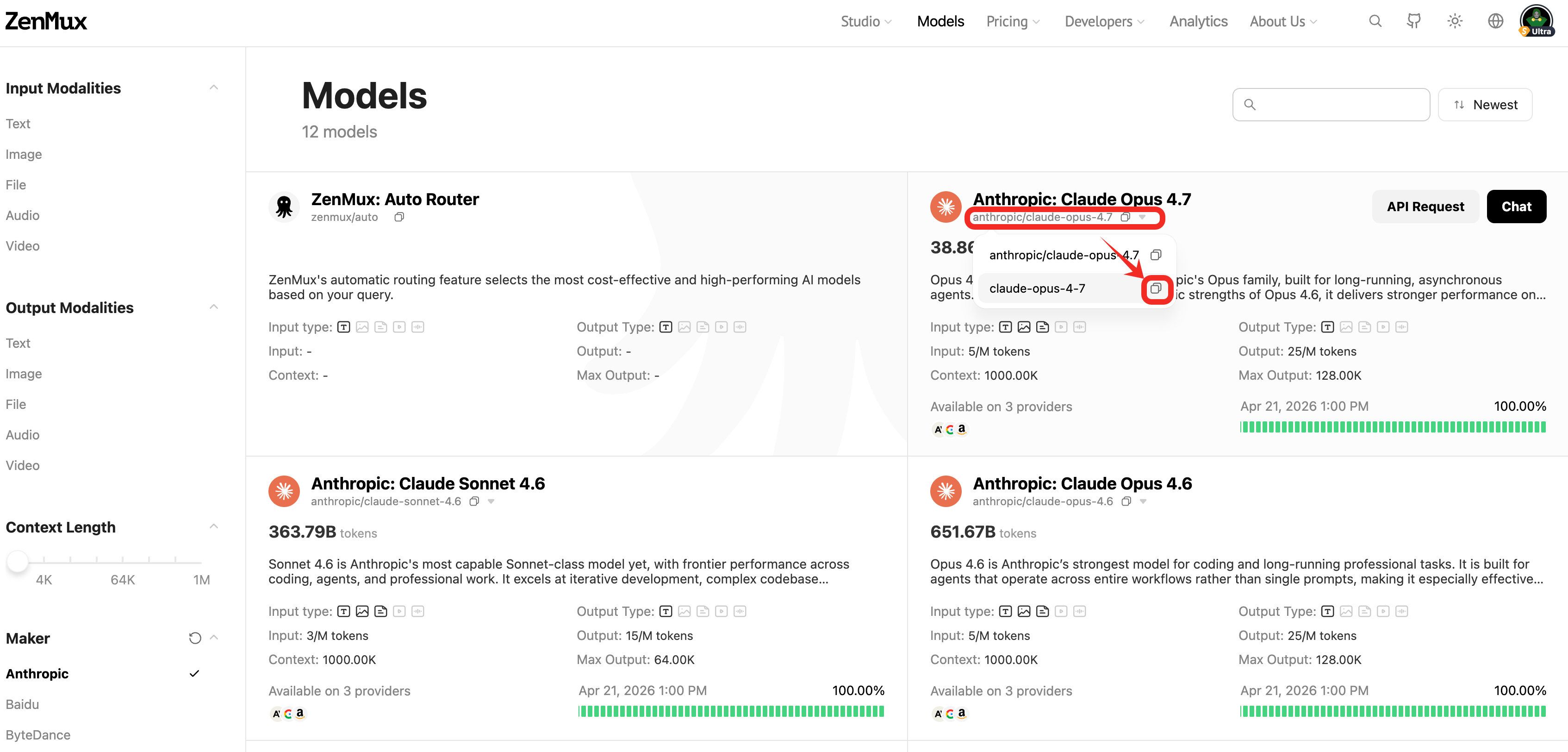
Aliases are curated and maintained by ZenMux. If you need a new alias for your workflow, feel free to send us a request — see the Contact Us page.
Example: Claude Code
# ✅ Use aliases so Claude Code unlocks 1M context, effort control, and other features
export ANTHROPIC_DEFAULT_HAIKU_MODEL="claude-haiku-4-5"
export ANTHROPIC_DEFAULT_SONNET_MODEL="claude-sonnet-4-6"
export ANTHROPIC_DEFAULT_OPUS_MODEL="claude-opus-4-7"
After editing, reload your shell (source ~/.zshrc or source ~/.bashrc) and restart Claude Code.
For end-to-end Claude Code setup, see the Claude Code Integration guide.