

Insurance Compensation
ZenMux provides a comprehensive insurance compensation system to help you monitor and analyze compensation cases resulting from service anomalies or performance issues in real-time. You can view aggregated compensation data, statistical charts categorized by type and model, as well as detailed compensation records, enabling you to better understand service performance and optimize cost control.
Overview
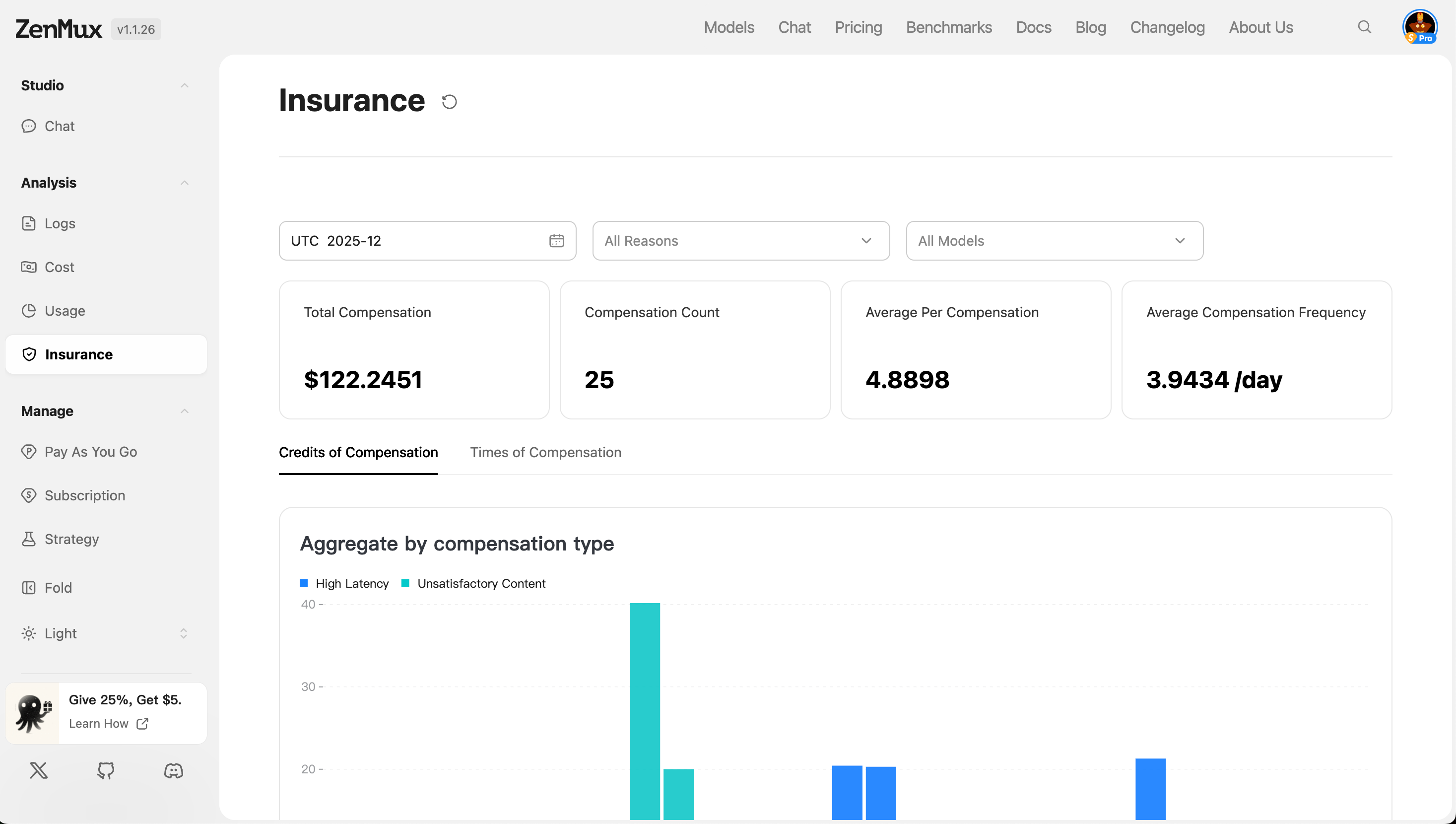
At the top of the page, key compensation metrics for the current filter criteria are displayed:
- Total Compensation: Shows the cumulative compensation amount generated within the specified time range.
- Compensation Count: Represents the number of requests that triggered the compensation mechanism.
- Average Per Compensation: The average compensation amount per request that triggered compensation.
- Average Compensation / Day: The average daily compensation count calculated based on the time range.
Multi-Dimensional Analysis
Switch between the following tabs to view compensation data from different perspectives:
- Credits of Compensation
- Times of Compensation
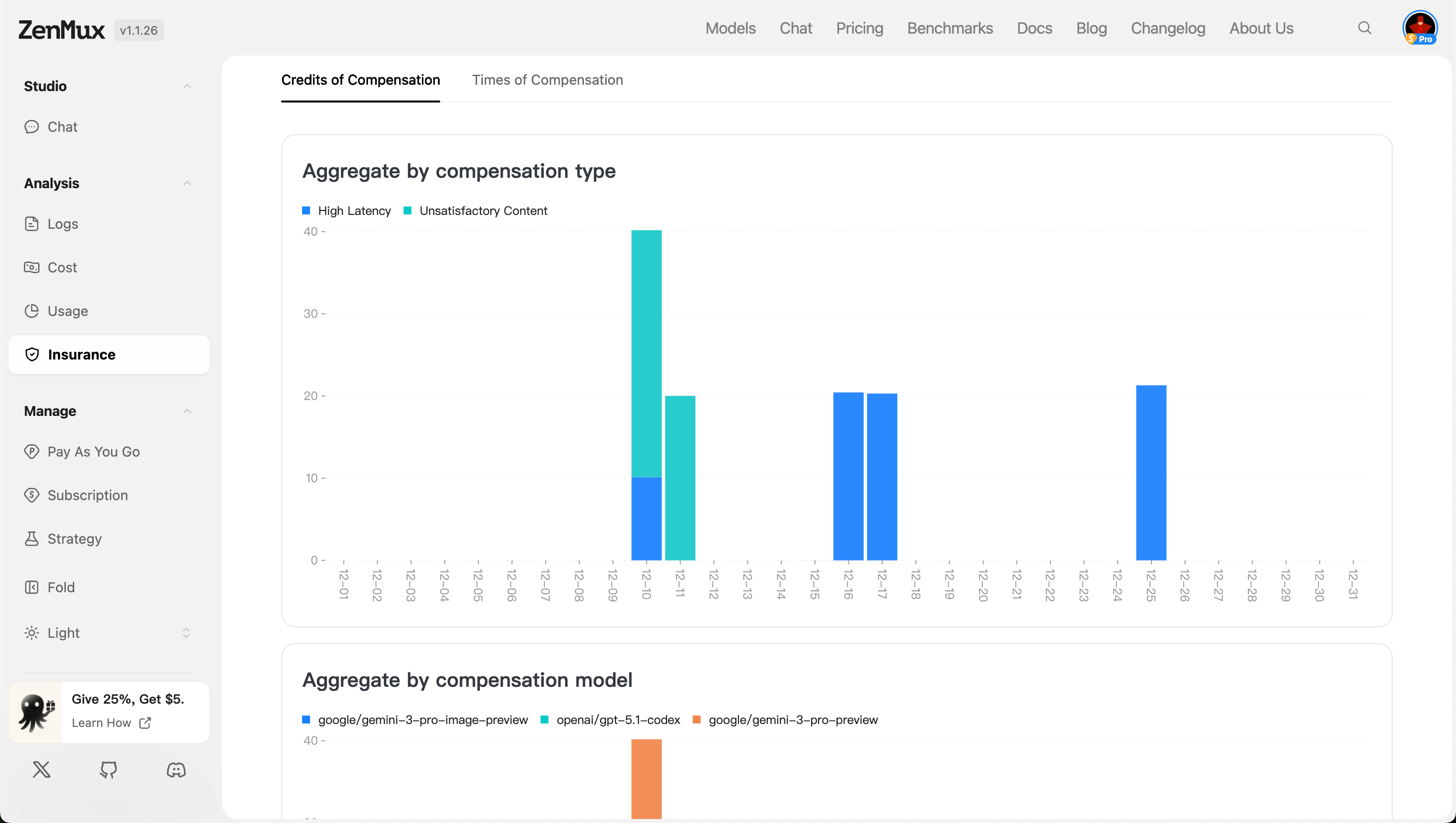
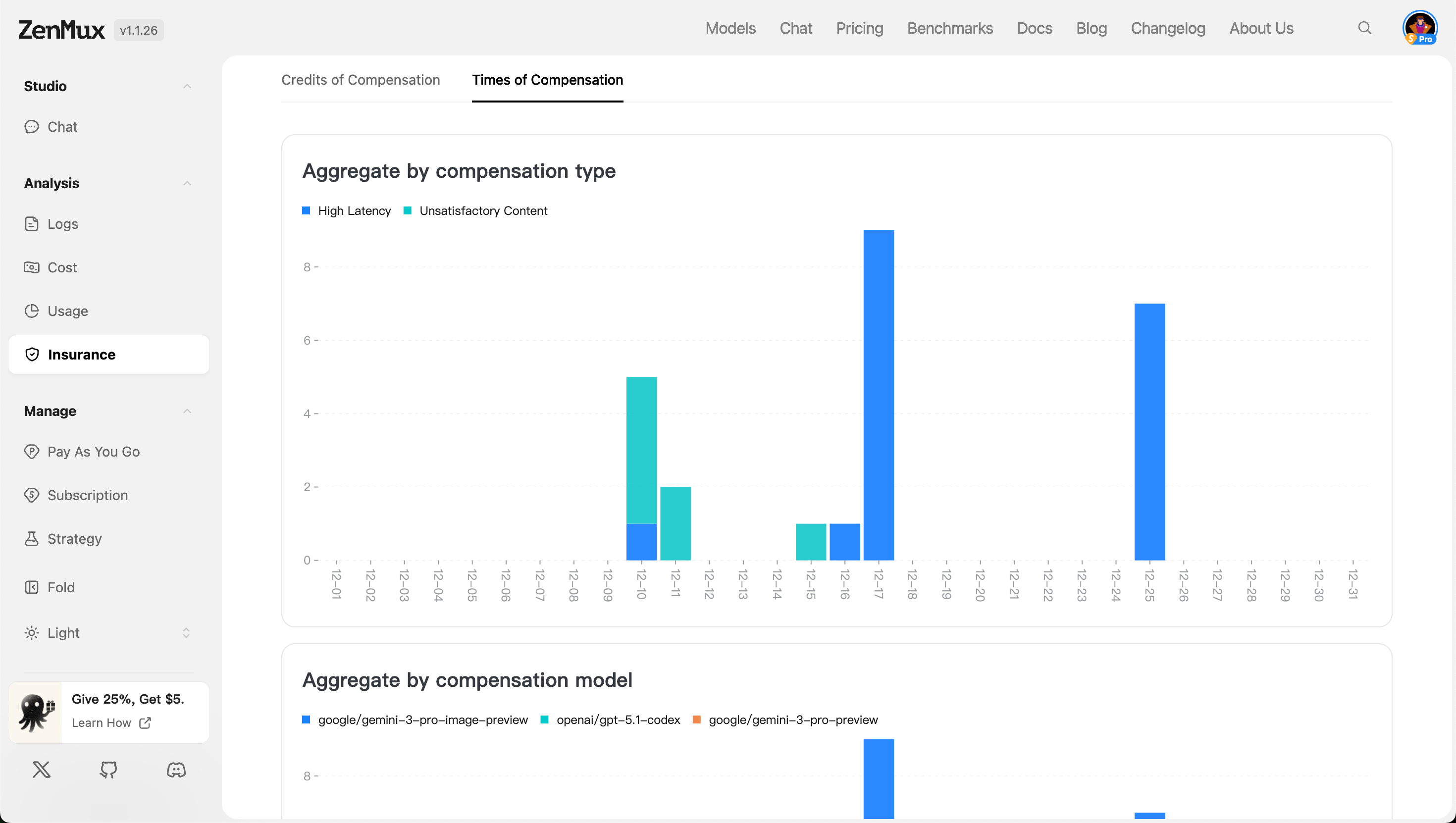
Aggregate by Compensation Type
- This chart displays the distribution of different compensation reasons, such as "Unsatisfactory Content" and "High Latency". Through this view, you can quickly identify the most common compensation types, helping to pinpoint system bottlenecks or service quality issues.
Aggregate by Compensation Model
- This chart categorizes compensation by the models used, showing the compensation generated by each model. This helps evaluate the service stability and reliability of different models, facilitating resource adjustments or optimization strategy formulation.
Compensation Details
The table below lists all specific request records that triggered compensation, supporting filtering and viewing across multiple dimensions.
Switch between different compensation categories using the following tabs:
- Unsatisfactory Content: Compensation triggered due to substandard generated content quality.
- High Latency: Compensation triggered due to excessive response latency.
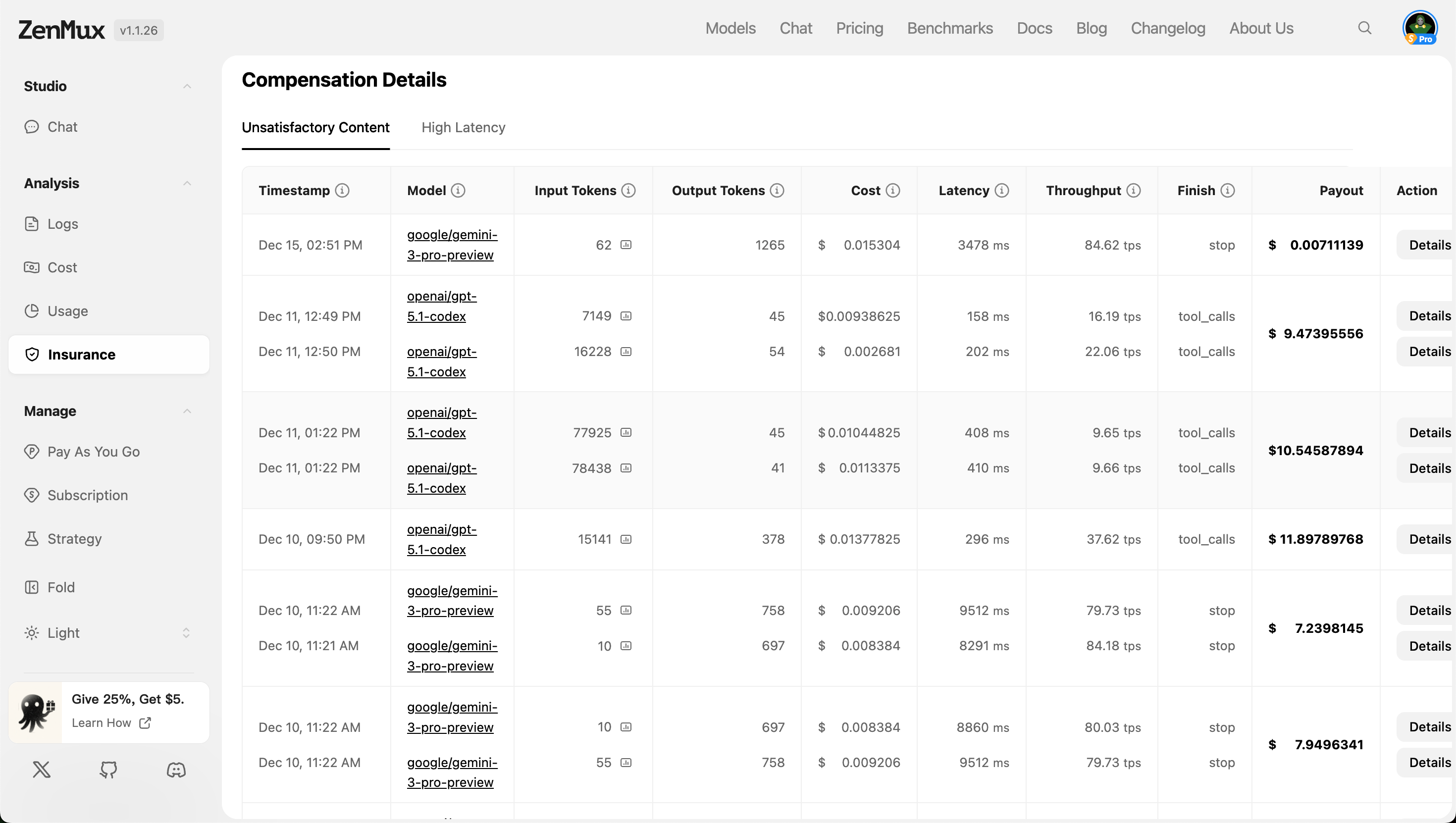
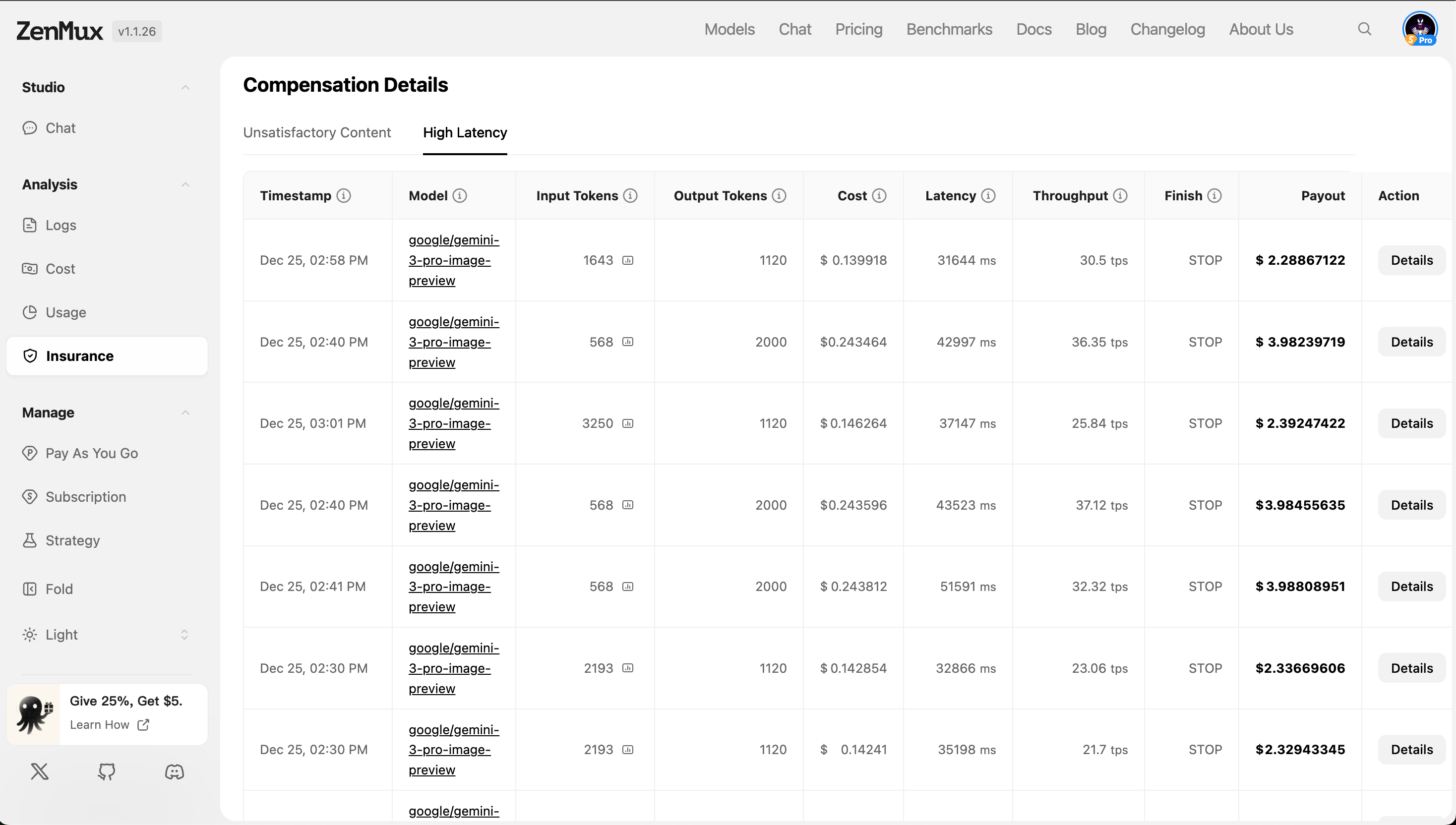
Field Descriptions
| Field | Description |
|---|---|
| Timestamp | The timestamp when the request occurred, accurate to the millisecond. |
| Model | The name of the model invoked (e.g., anthropic/claude-3.5-sonnet). |
| Input Tokens | The number of input tokens, used to measure request complexity. |
| Output Tokens | The number of output tokens, reflecting the length of generated content. |
| Cost | The actual cost of this request (including compensation portion). |
| Latency | Request processing time (in milliseconds); high latency may trigger compensation. |
| Throughput | Tokens processed per second, indicating system throughput capacity. |
| Finish | Request completion status (e.g., stop, length, error, etc.). |
| Payout | The actual compensation amount paid out (if applicable). |
| Action | Action button; click to view the request details page or original Meta information. |
Usage Recommendations
- Regularly Check Compensation Trends: Use the time range filter to observe whether compensation increases over time, determining if there are systemic risks.
- Focus on High-Frequency Compensation Types: Prioritize resolving frequently occurring compensation causes to improve overall service quality.
- Compare Different Model Performance: Use the "Aggregate by Model" view to identify underperforming models and consider replacement or optimization.
- Analyze Specific Cases In-Depth: Click "Details" to enter the request details page and view original request parameters, response content, and logs to help troubleshoot root causes.
💡 Tip: For further analysis of raw data, you can view complete Meta information on the "Request Details Page", including API request headers, context, error codes, and more.
Contact Us
If you encounter any issues during use, or have any suggestions and feedback, please feel free to contact us through the following channels:
- Official Website: https://zenmux.ai
- Technical Support Email: [email protected]
- Business Inquiries Email: [email protected]
- Twitter: @ZenMuxAI
- Discord Community: http://discord.gg/vHZZzj84Bm
For more contact methods and detailed information, please visit our Contact Us page.