

Subscription Plans
The ZenMux Builder Plan subscription offers individual developers a fixed monthly fee and a predictable way to call AI models—so you can focus on coding and creating without worrying about the cost of each API request.
What Are Flows?
A Flow is ZenMux’s composite billing unit that combines token consumption and per-request overhead. You can think of it as a currency—just as different products have different prices in USD, different AI models consume different numbers of Flows per request. The Flow/USD exchange rate may fluctuate over time, and the latest rate is always published in real time on the Pricing page.
💱 Real-Time Flow/USD Exchange Rate
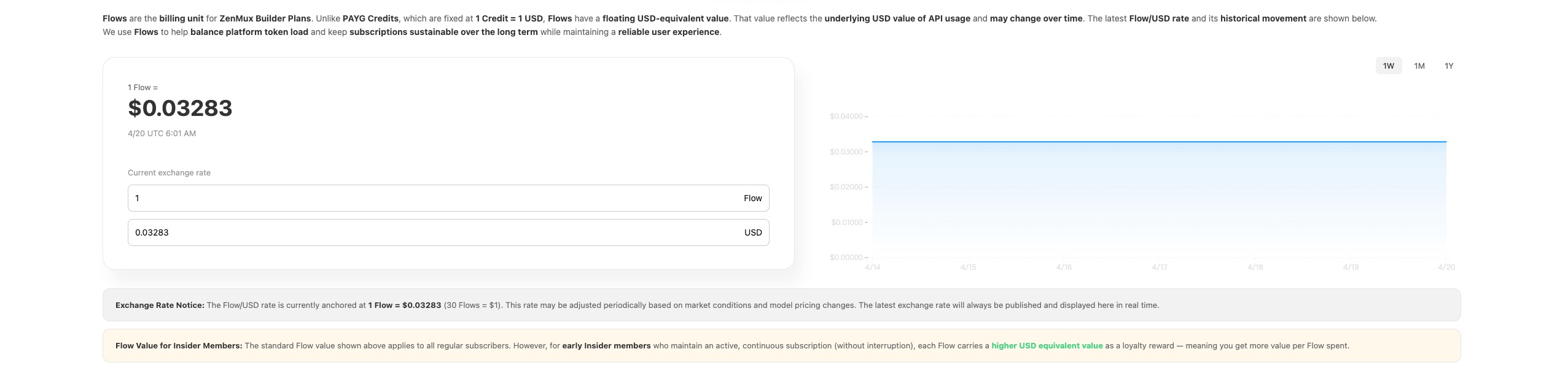
💡 Screenshot example
The Flow/USD exchange rate and related data are dynamically calculated. The screenshot is for reference only. Please refer to the real-time data shown on the Pricing page.
Exchange rate notes
The Flow/USD exchange rate is currently anchored at 1 Flow ≈ $0.03283 (approximately 30 Flows = $1). This rate may be adjusted periodically based on market conditions and model pricing changes. The latest exchange rate will always be published and displayed here in real time.
💡 Insider member Flow value
The standard Flow value above applies to all regular subscription users. However, for early Insider members who maintain an active, continuous subscription (no interruptions), each Flow will have a higher USD equivalent value as a loyalty reward—meaning you get more value per Flow consumed.
Important — Abuse policy
For accounts found violating the Builder Plan Terms of Service (e.g., automated abuse, resource hoarding, unauthorized reselling, etc.), the effective Flow value will be reduced below the standard rate. This means the USD equivalent value per Flow will decrease. Please use your subscription responsibly.
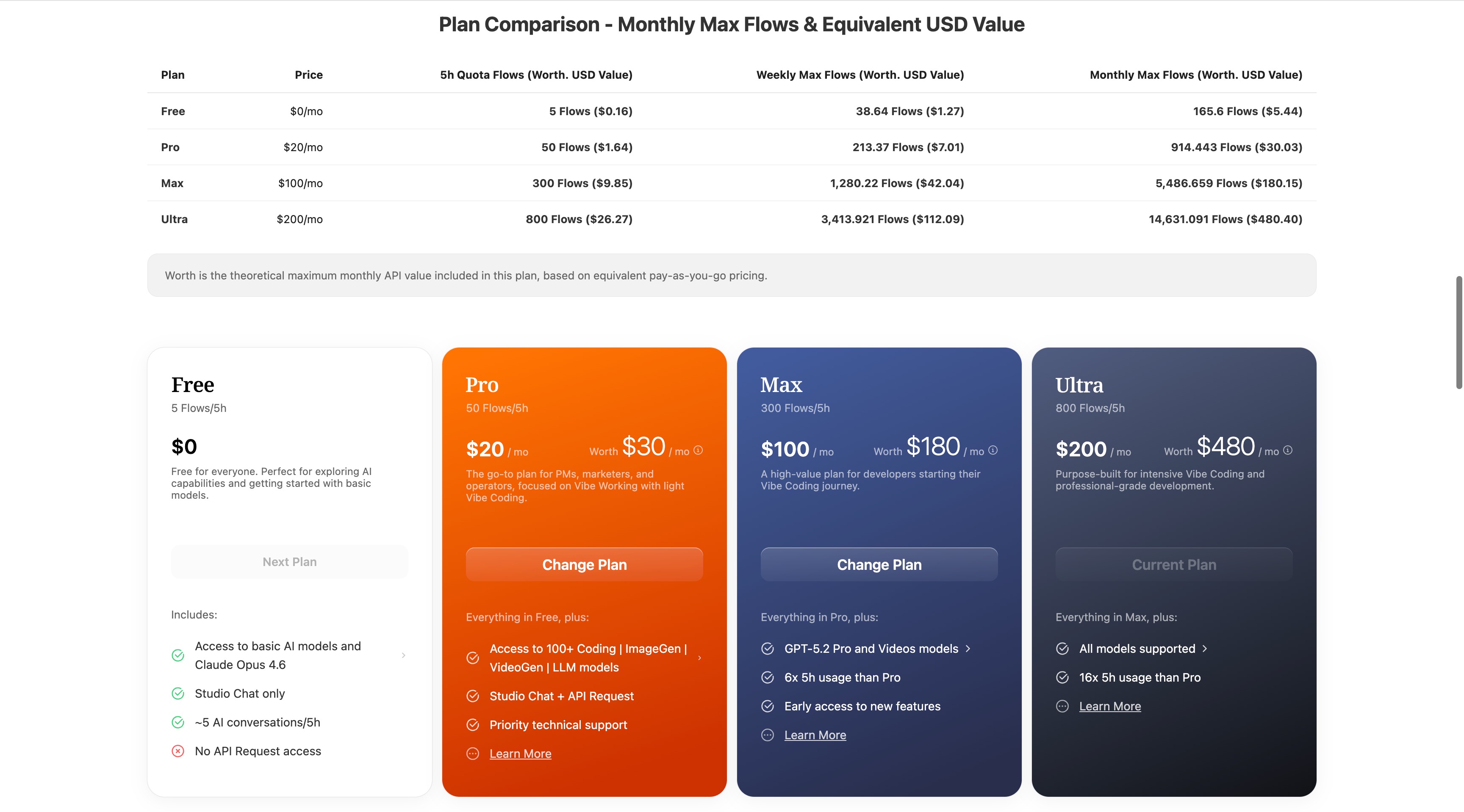
📊 Plan Comparison — Monthly Max Flows and USD Equivalent Value
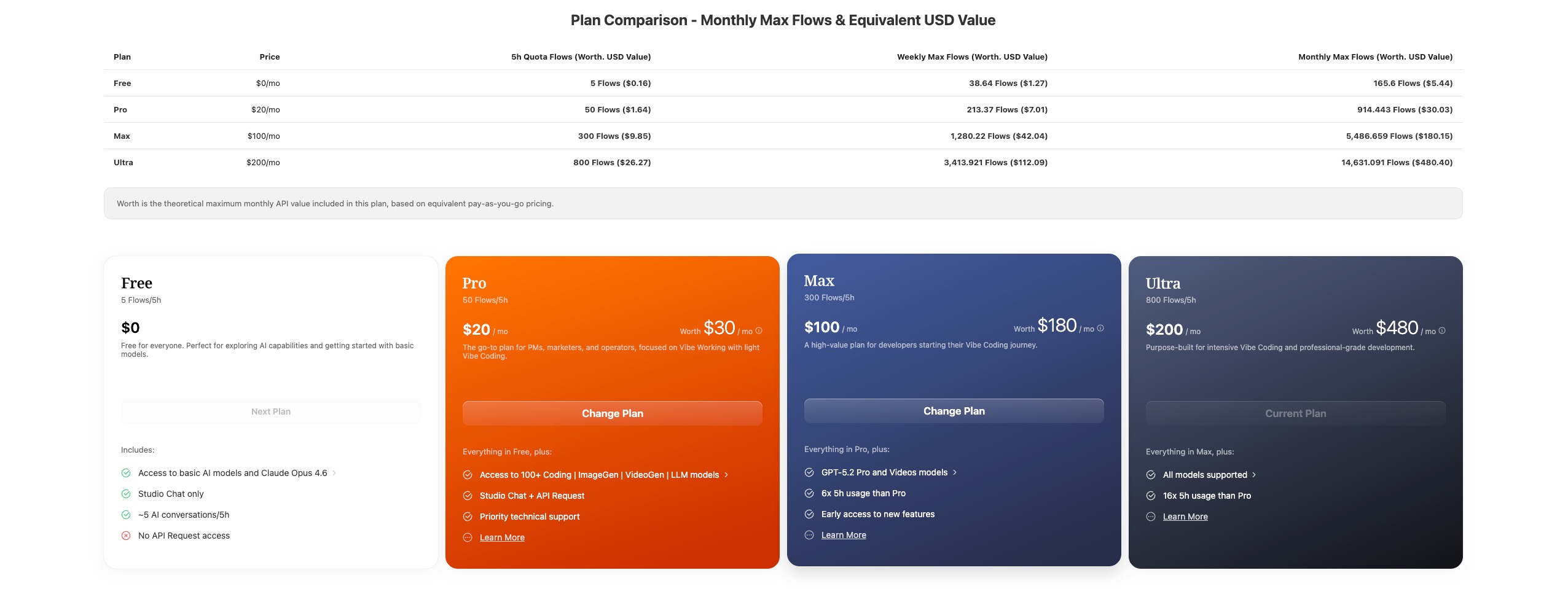
💡 Screenshot example
Plan comparison data is dynamically calculated. The screenshot is for reference only. Please refer to the real-time data shown on the Pricing page.
| Plan | Price | 5h Quota (Flows) | Weekly Max Flows | Monthly Max Flows | USD Equivalent Value | Value Multiplier |
|---|---|---|---|---|---|---|
| Free | $0/mo | 5 | 38.64 | 165.6 | $5.44 | - |
| Pro | $20/mo | 50 | 213.37 | 914.443 | $30.03 | 1.50x |
| Max | $100/mo | 300 | 1,280.22 | 5,486.659 | $180.15 | 1.80x |
| Ultra | $200/mo | 800 | 3,413.921 | 14,631.091 | $480.40 | 2.40x |
USD Equivalent Value = Monthly Max Flows × Flow unit price ($0.03283/Flow)
Value Multiplier = USD Equivalent Value / Plan price — indicates how many times more API value you get compared to the subscription fee
Why Choose the Builder Plan?
💡 Key Benefits
| Pain Point Scenario | Subscription Solution |
|---|---|
| Worried about burning money while vibe coding | Fixed pricing starting at $20/month—code freely |
| High cost to learn new tech | Explore a wide range of AI models at low cost |
| Messy multi-platform account management | One API Key to call all models |
| Diverse use cases | Coding + image generation + chat—full coverage |
🚀 Three Core Values
Full use-case model coverage
The Builder Plan covers three major model categories. Whether you’re a developer, designer, product manager, or operator, one subscription meets the full-spectrum needs of Vibe Builders:
Model Category Representative Models Coding models Claude Opus 4.7 / GPT-5.4 / Gemini-3.1-Pro-Preview ... Image generation NanoBananaPro / GPT-Image-1.5 ... (rolling out) Text generation GPT-5.4 / Qwen3.6-Plus / GLM 5.1 / ERNIE 5.0 ... An all-star model lineup
One subscription, orchestrating world-class models (Gemini 2.5 Pro, the GPT‑5 series, Claude Opus/Sonnet 4 series, Grok 4 series, etc.). Get access to the latest top models immediately—like commanding the strongest compute fleet on the internet.
Seamless IDE integration
No tool lock-in. One subscription API Key works across mainstream community developer tools such as Claude Code, Cursor, CodeX, and more.
Plan Comparison
Free - Free Trial
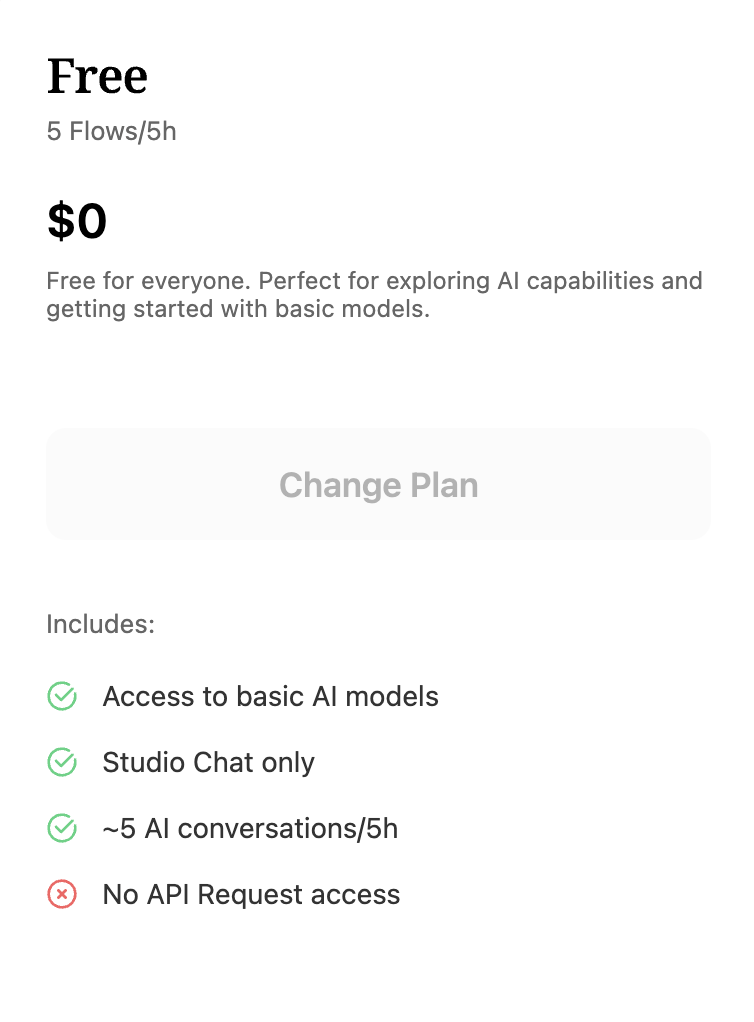
Supported models:
deepseek/deepseek-chat- DeepSeek V3.2 (Non-thinking Mode)deepseek/deepseek-reasoner- DeepSeek V3.2 (Thinking Mode)inclusionai/ling-1t- inclusionAI: Ling-1Tinclusionai/ling-mini-2.0- inclusionAI: Ling-Mini-2.0inclusionai/ring-1t- inclusionAI: Ring-1Tinclusionai/ring-mini-2.0- inclusionAI: Ring-Mini-2.0kuaishou/kat-coder-pro-v1-free- KAT Coder Pro V1 (Free)minimax/minimax-m2.1- MiniMax M2.1sapiens-ai/agnes-1.5-lite- Sapiens AI: Agnes 1.5 Litesapiens-ai/agnes-1.5-pro- Sapiens AI: Agnes 1.5 Prosapiens-ai/agnes-image-1.2- Sapiens AI: Agnes Image 1.2 (Image Generation)stepfun/step-3- StepFun: Step-3stepfun/step-3.5-flash- StepFun: Step 3.5 Flashstepfun/step-3.5-flash-free- StepFun: Step 3.5 Flash (Free)xiaomi/mimo-v2-flash- Xiaomi: MiMo V2 Flashxiaomi/mimo-v2-flash-free- Xiaomi: MiMo V2 Flash (Free)z-ai/glm-4.6v-flash- Z.AI: GLM 4.6V FlashXz-ai/glm-4.6v-flash-free- Z.AI: GLM 4.6V Flash (Free)z-ai/glm-4.7- Z.AI: GLM 4.7z-ai/glm-4.7-flash-free- Z.AI: GLM 4.7 Flash (Free)openai/gpt-image-2- OpenAI: GPT Image 2 (Image Generation)
Pro - Top Choice for Developers
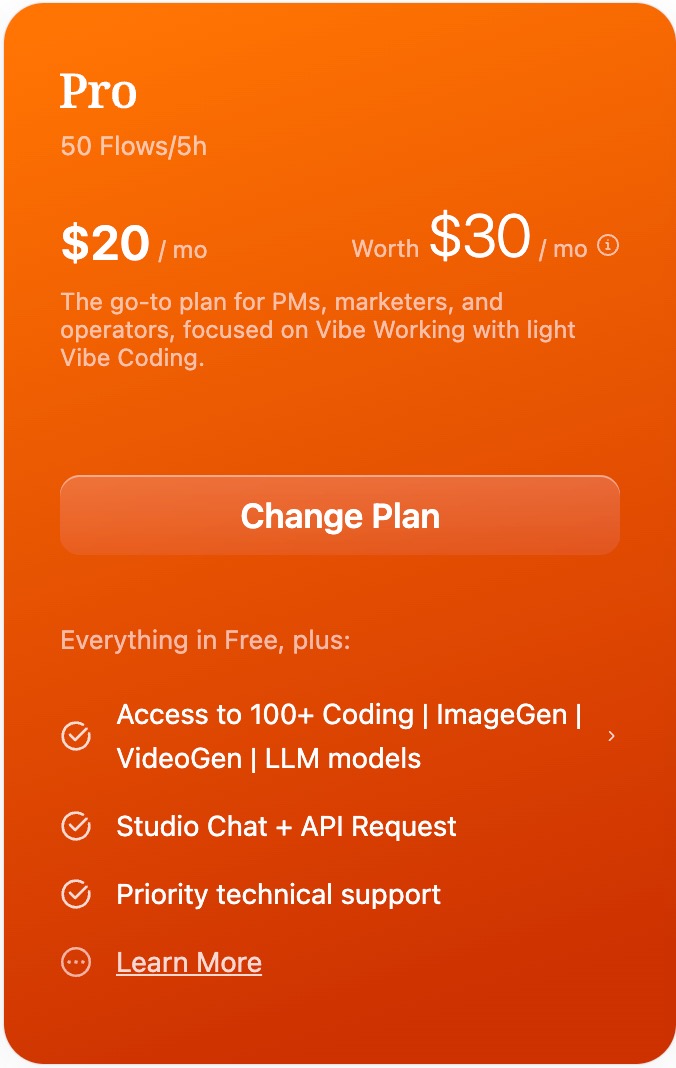
Supported models: 150+ models (text, image generation, video generation, embedding), organized by provider below
Anthropic Claude Series
anthropic/claude-opus-4.7- Claude Opus 4.7anthropic/claude-opus-4.6- Claude Opus 4.6anthropic/claude-opus-4.5- Claude Opus 4.5anthropic/claude-opus-4.1- Claude Opus 4.1anthropic/claude-opus-4- Claude Opus 4anthropic/claude-sonnet-4.6- Claude Sonnet 4.6anthropic/claude-sonnet-4.5- Claude Sonnet 4.5anthropic/claude-sonnet-4- Claude Sonnet 4anthropic/claude-haiku-4.5- Claude Haiku 4.5anthropic/claude-3.7-sonnet- Claude 3.7 Sonnetanthropic/claude-3.5-sonnet- Claude 3.5 Sonnetanthropic/claude-3.5-haiku- Claude 3.5 Haiku
OpenAI GPT Series
openai/gpt-5.4- GPT‑5.4openai/gpt-5.4-mini- GPT‑5.4 Miniopenai/gpt-5.4-nano- GPT‑5.4 Nanoopenai/gpt-5.3-chat- GPT‑5.3 Chatopenai/gpt-5.3-codex- GPT‑5.3 Codexopenai/gpt-5.2- GPT‑5.2openai/gpt-5.2-chat- GPT‑5.2 Chatopenai/gpt-5.2-codex- GPT‑5.2 Codexopenai/gpt-5.1- GPT‑5.1openai/gpt-5.1-chat- GPT‑5.1 Chatopenai/gpt-5.1-codex- GPT‑5.1 Codexopenai/gpt-5.1-codex-mini- GPT‑5.1 Codex Miniopenai/gpt-5- GPT‑5openai/gpt-5-chat- GPT‑5 Chatopenai/gpt-5-codex- GPT‑5 Codexopenai/gpt-5-mini- GPT‑5 Miniopenai/gpt-5-nano- GPT‑5 Nanoopenai/gpt-4.1- GPT‑4.1openai/gpt-4.1-mini- GPT‑4.1 Miniopenai/gpt-4.1-nano- GPT‑4.1 Nanoopenai/gpt-4o- GPT‑4oopenai/gpt-4o-mini- GPT‑4o Miniopenai/o4-mini- o4 Mini
Google Gemini / Gemma Series
google/gemini-3.1-pro-preview- Gemini 3.1 Pro Previewgoogle/gemini-3.1-flash-lite-preview- Gemini 3.1 Flash Lite Previewgoogle/gemini-3-flash-preview- Gemini 3 Flash Previewgoogle/gemini-3-pro-preview- Gemini 3 Pro Previewgoogle/gemini-2.5-pro- Gemini 2.5 Progoogle/gemini-2.5-flash- Gemini 2.5 Flashgoogle/gemini-2.5-flash-lite- Gemini 2.5 Flash Litegoogle/gemini-2.0-flash- Gemini 2.0 Flashgoogle/gemini-2.0-flash-lite-001- Gemini 2.0 Flash Litegoogle/gemma-3-12b-it- Gemma 3 12B
xAI Grok Series
x-ai/grok-4- Grok 4x-ai/grok-4-fast- Grok 4 Fastx-ai/grok-4-fast-non-reasoning- Grok 4 Fast Non‑Reasoningx-ai/grok-4.1-fast- Grok 4.1 Fastx-ai/grok-4.1-fast-non-reasoning- Grok 4.1 Fast Non‑Reasoningx-ai/grok-4.2-fast- Grok 4.2 Fastx-ai/grok-4.2-fast-non-reasoning- Grok 4.2 Fast Non‑Reasoningx-ai/grok-code-fast-1- Grok Code Fast 1
Z.AI GLM Series
z-ai/glm-5.1- GLM 5.1z-ai/glm-5- GLM 5z-ai/glm-5-turbo- GLM 5 Turboz-ai/glm-5v-turbo- GLM 5V Turboz-ai/glm-4.7- GLM 4.7z-ai/glm-4.7-flashx- GLM 4.7 FlashXz-ai/glm-4.7-flash-free- GLM 4.7 Flash (Free)z-ai/glm-4.6v- GLM 4.6Vz-ai/glm-4.6v-flash- GLM 4.6V FlashXz-ai/glm-4.6v-flash-free- GLM 4.6V Flash (Free)z-ai/glm-4.6- GLM 4.6z-ai/glm-4.5- GLM 4.5z-ai/glm-4.5-air- GLM 4.5 Air
DeepSeek Series
deepseek/deepseek-v3.2- DeepSeek V3.2deepseek/deepseek-v3.2-exp- DeepSeek V3.2 Expdeepseek/deepseek-chat- DeepSeek Chat (V3.2 Non-thinking)deepseek/deepseek-chat-v3.1- DeepSeek Chat V3.1deepseek/deepseek-reasoner- DeepSeek Reasoner (V3.2 Thinking)deepseek/deepseek-r1-0528- DeepSeek R1 0528
Qwen Series
qwen/qwen3.6-plus- Qwen3.6 Plusqwen/qwen3.5-plus- Qwen3.5 Plusqwen/qwen3.5-flash- Qwen3.5 Flashqwen/qwen3-coder- Qwen3 Coderqwen/qwen3-coder-plus- Qwen3 Coder Plusqwen/qwen3-max- Qwen3 Max Thinkingqwen/qwen3-max-preview- Qwen3 Max Thinking Previewqwen/qwen3-vl-plus- Qwen3 VL Plusqwen/qwen3-14b- Qwen3 14Bqwen/qwen3-235b-a22b-2507- Qwen3 235B A22B Instruct 2507qwen/qwen3-235b-a22b-thinking-2507- Qwen3 235B A22B Thinking 2507
Moonshot / Kimi Series
moonshotai/kimi-k2.6- Kimi K2.6moonshotai/kimi-k2.5- Kimi K2.5moonshotai/kimi-k2-thinking- Kimi K2 Thinkingmoonshotai/kimi-k2-thinking-turbo- Kimi K2 Thinking Turbomoonshotai/kimi-k2-0711- Kimi K2 0711moonshotai/kimi-k2-0905- Kimi K2 0905
Baidu ERNIE Series
baidu/ernie-5.0-thinking-preview- ERNIE 5.0baidu/ernie-x1.1-preview- ERNIE X1.1 Preview
InclusionAI Series
inclusionai/ling-1t- Ling-1Tinclusionai/ling-flash-2.0- Ling Flash 2.0inclusionai/ling-mini-2.0- Ling Mini 2.0inclusionai/llada2.1-flash- LLaDA 2.1 Flashinclusionai/llada2.0-flash-cap- LLaDA 2.0 Flash Capinclusionai/ming-flash-omni-2.0- Ming Flash Omni 2.0inclusionai/ring-1t- Ring-1Tinclusionai/ring-flash-2.0- Ring Flash 2.0inclusionai/ring-mini-2.0- Ring Mini 2.0
Meta Llama Series
meta/llama-3.3-70b-instruct- Llama 3.3 70B Instructmeta/llama-4-scout-17b-16e-instruct- Llama 4 Scout Instruct
Mistral Series
mistralai/mistral-large-2512- Mistral Large 3
MiniMax Series
minimax/minimax-m2.7- MiniMax M2.7minimax/minimax-m2.7-highspeed- MiniMax M2.7 Highspeedminimax/minimax-m2.5- MiniMax M2.5minimax/minimax-m2.5-lightning- MiniMax M2.5 Highspeedminimax/minimax-m2.1- MiniMax M2.1minimax/minimax-m2- MiniMax M2minimax/minimax-m2-her- MiniMax M2 Her
Kuaishou
kuaishou/kat-coder-pro-v2- KAT Coder Pro V2kuaishou/kat-coder-pro-v1- KAT Coder Pro V1kuaishou/kat-coder-pro-v1-free- KAT Coder Pro V1 (Free)
StepFun
stepfun/step-3.5-flash- Step 3.5 Flashstepfun/step-3.5-flash-free- Step 3.5 Flash (Free)stepfun/step-3- Step 3
ByteDance / Volcengine Doubao
Doubao models support both
bytedance/*andvolcengine/*slug prefixes with identical functionality.
bytedance/doubao-seed-2.0-pro- Doubao Seed 2.0 Probytedance/doubao-seed-2.0-code- Doubao Seed 2.0 Codebytedance/doubao-seed-2.0-mini- Doubao Seed 2.0 Minibytedance/doubao-seed-2.0-lite- Doubao Seed 2.0 Litebytedance/doubao-seed-1.8- Doubao Seed 1.8bytedance/doubao-seed-code- Doubao Seed Codevolcengine/doubao-seed-1-6-vision- Doubao Seed 1.6 Vision
Tencent
tencent/hunyuan-2.0-thinking- HunyuanTurbo 2.0 Thinking
Sapiens AI Series
sapiens-ai/agnes-1.5-pro- Agnes 1.5 Prosapiens-ai/agnes-1.5-lite- Agnes 1.5 Lite
Xiaomi
xiaomi/mimo-v2-pro- MiMo V2 Proxiaomi/mimo-v2-omni- MiMo V2 Omnixiaomi/mimo-v2-flash- MiMo V2 Flashxiaomi/mimo-v2-flash-free- MiMo V2 Flash (Free)
Image Generation Models
openai/gpt-image-2- GPT Image 2openai/gpt-image-1.5- GPT Image 1.5google/gemini-3.1-flash-image-preview- Gemini 3.1 Flash Image Previewgoogle/gemini-3-pro-image-preview- Gemini 3 Pro Image Previewgoogle/gemini-2.5-flash-image- Gemini 2.5 Flash Imageqwen/qwen-image-2.0-pro- Qwen Image 2.0 Proqwen/qwen-image-2.0- Qwen Image 2.0sapiens-ai/agnes-image-1.2- Agnes Image 1.2tencent/hunyuan-image3- Hunyuan Image 3z-ai/glm-image- GLM Imagebytedance/doubao-seedream-5.0-lite- Doubao Seedream 5.0 Lite
Video Generation Models
klingai/kling-v2- Kling V2sapiens-ai/agnes-video-v1.2- Agnes Video V1.2
Embedding Models
openai/text-embedding-3-small- Text Embedding 3 Small
Max - High-Intensity Development
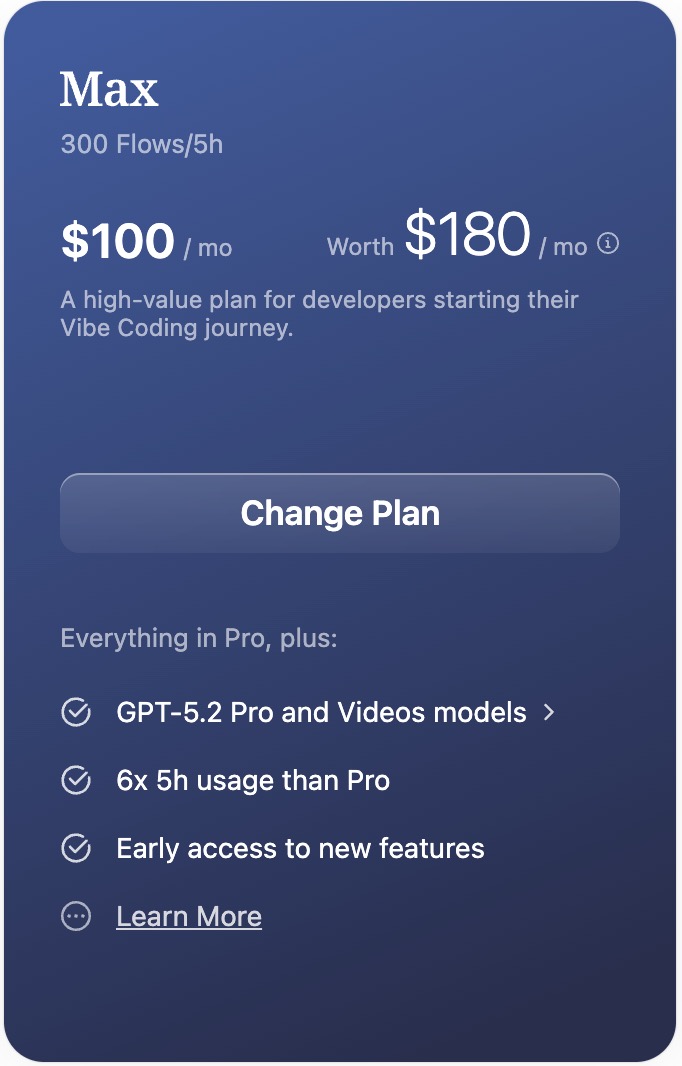
Additional exclusive models (all Pro models + the following):
Ultra-flagship text models:
openai/gpt-5.4-pro- GPT-5.4 Proopenai/gpt-5.2-pro- GPT-5.2 Proopenai/gpt-5-pro- GPT-5 Pro
Ultra-flagship video generation models:
google/veo-3.1-generate-001- Google Veo 3.1google/veo-3.1-fast-generate-001- Google Veo 3.1 Fastgoogle/veo-3.1-lite-generate-001- Google Veo 3.1 Litebytedance/doubao-seedance-2.0- Doubao Seedance 2.0bytedance/doubao-seedance-1.5-pro- Doubao Seedance 1.5 Pro
Ultra - Professional-Grade Flagship
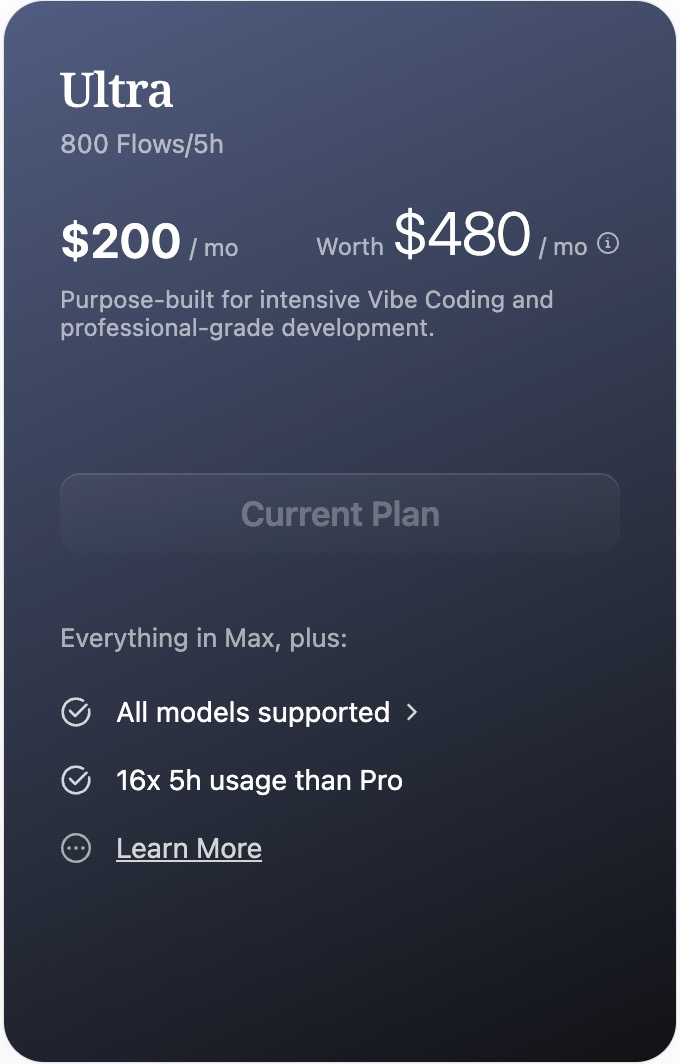
Supported models: Same as the Max plan, including all premium models and ultra-flagship models.
Usage Limits
⚠️ Important
Subscription plans are designed for personal development, learning/exploration, and vibe coding in non-production scenarios. Please follow the usage guidelines below:
Rate Limits
- Rate Limit: 10-15 RPM (requests per minute)
- Quota window: Refreshes within a rolling 5-hour window
- Weekly limit: Resets within a rolling weekly window
Applicable Scenarios
✅ Allowed:
- Personal development and learning
- Vibe coding and rapid prototyping
- Technical exploration and experimentation
- Personal projects and non-commercial applications
❌ Not allowed:
- Production environments that are already live
- Commercial products or services
- End-user-facing applications
- Abusive behaviors such as multi-account pooling/rotation
💡 Production recommendation
If your project is about to go live or is already commercialized, switch to the Pay-As-You-Go usage-based plan to get:
- Higher SLA coverage
- More stable service quality
- More flexible scalability
- Professional business support
How to Subscribe
Step 1: Review plan details
Visit the ZenMux Pricing page to see detailed information and pricing for all subscription plans.
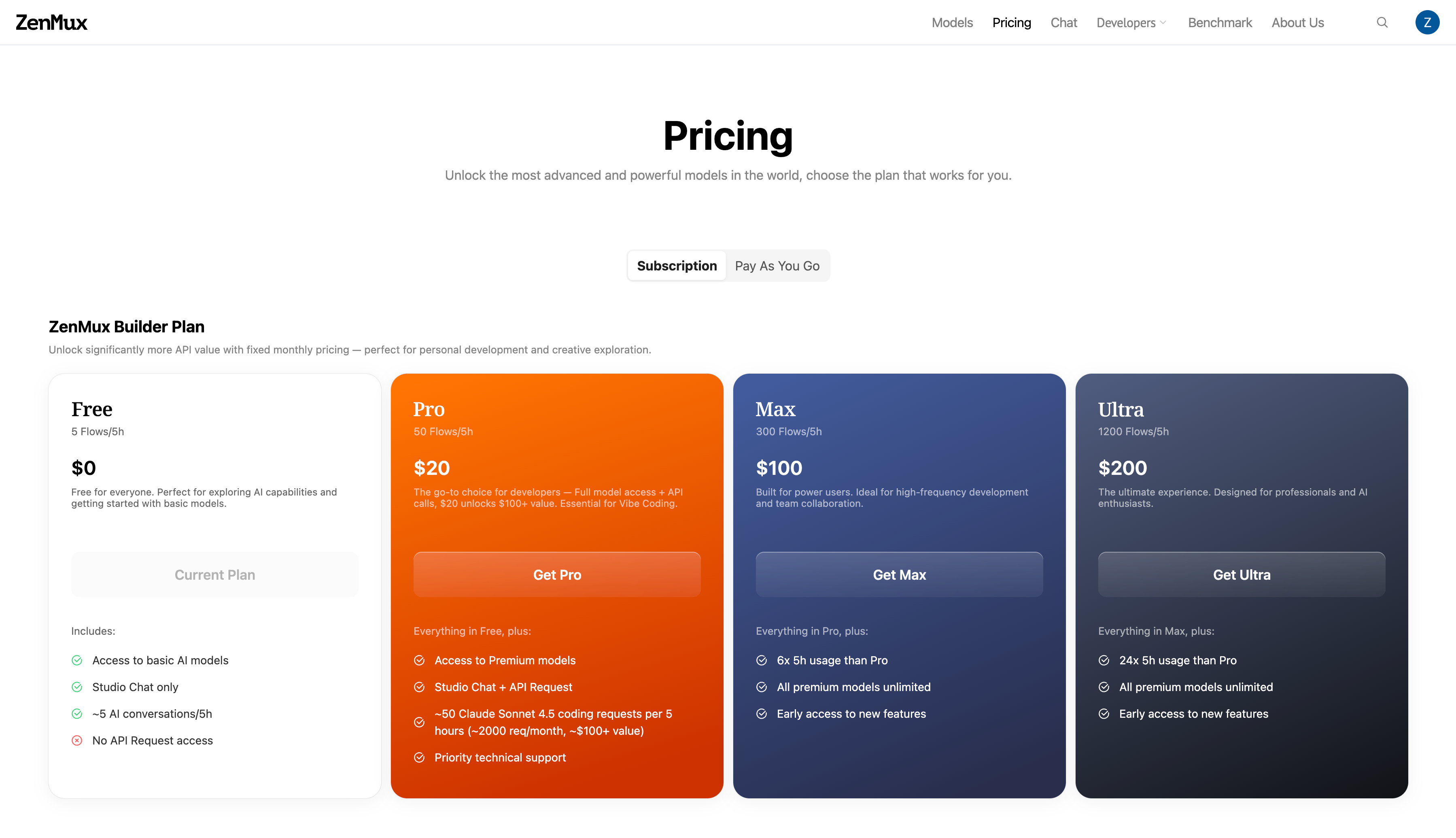
Step 2: Choose and subscribe
- Select the plan that fits your needs on the Pricing page
- Click "Get Max" or "Get Ultra" for the corresponding plan (Pro users click "Upgrade")
- Complete the payment flow
Step 3: Manage your subscription and get an API Key
After subscribing successfully, visit the Subscription Management page:
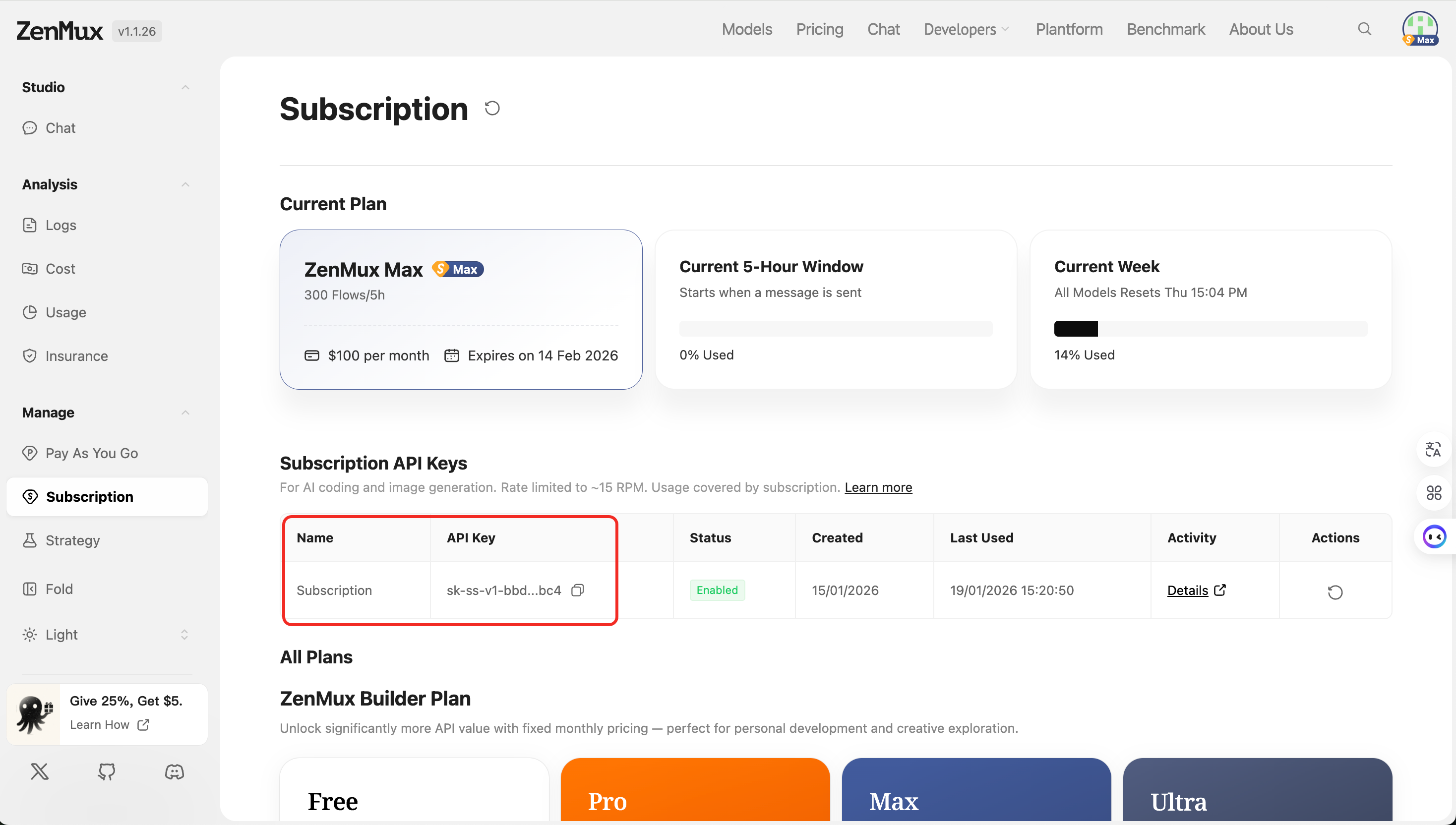
📊 View usage
- Usage and remaining time in the current 5-hour window
- This week’s cumulative usage stats
- Flow consumption breakdown
🔑 Get a subscription API Key
- Generate an API Key dedicated to subscriptions
- Manage and rotate existing keys
- View the key’s last used time
💳 Manage subscription
- View current plan information
- Upgrade or downgrade your plan
- View billing history
Extra Usage - Automatic Overage Switching
When enabled, once your Builder Plan subscription quota hits the 5-hour or weekly limit, it automatically switches to your selected Pay As You Go Key to ensure uninterrupted usage; when the quota resets, it automatically switches back to the subscription Key.
💡 Key Benefits
- Seamless switching - Automatically switches to pay-as-you-go when quota runs out, no manual API Key changes needed
- Uninterrupted workflows - No impact on your dev/coding/chat flows
- Automatic recovery - Switches back to subscription billing once quota is restored
- Flexible control - Enable or disable anytime
Setup Steps
Go to the Subscription Management page and follow the steps below to configure Extra Usage:
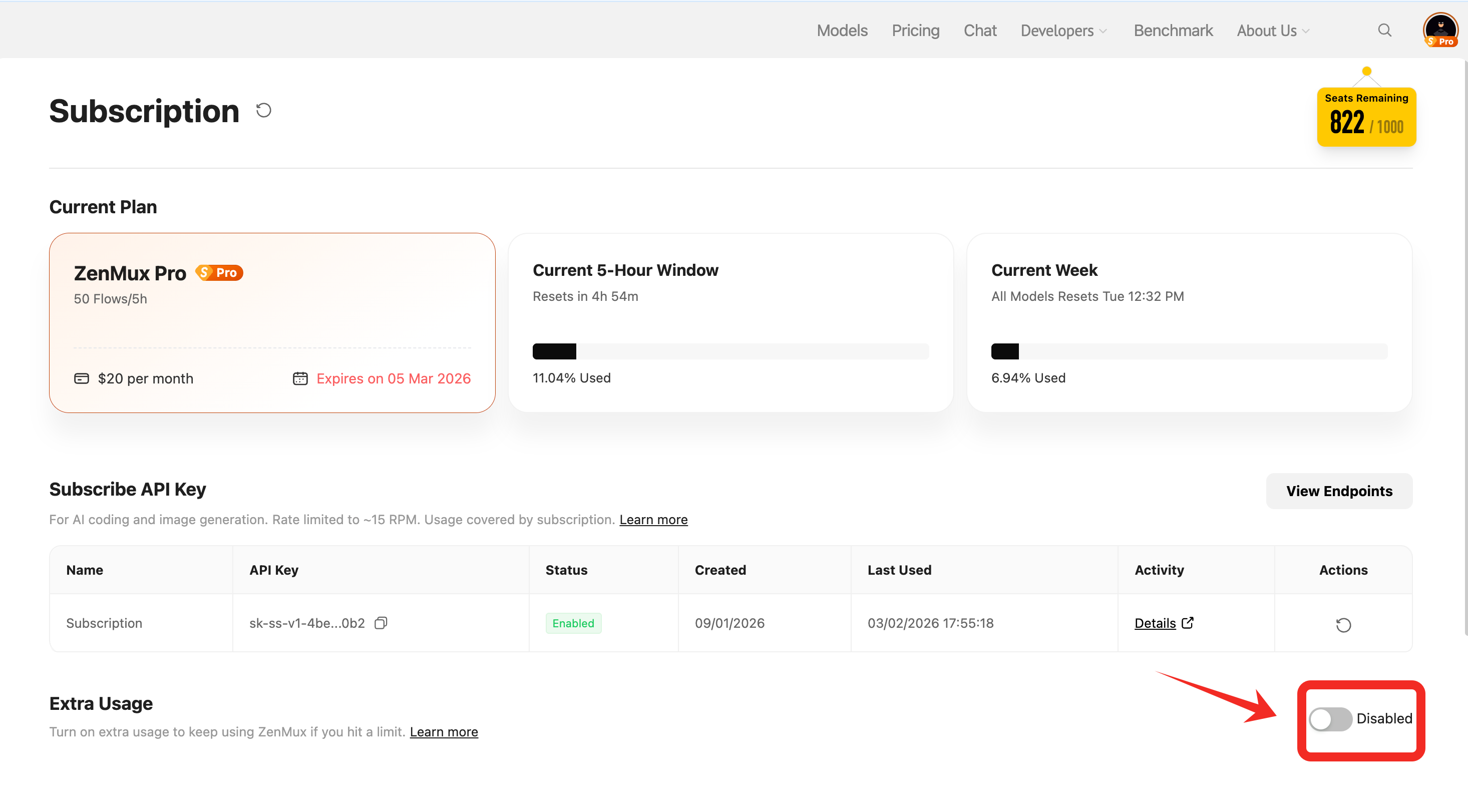
Step 1: Enable Extra Usage
In Subscription Management, find the Extra Usage section and toggle the switch on the right to enable it.
Step 2: Select a Pay As You Go API Key
After toggling, a "Select a Key" dialog will pop up. You can:
- Choose an existing Pay As You Go API Key from the dropdown
- Or click "Create new key" to create a new pay-as-you-go API Key
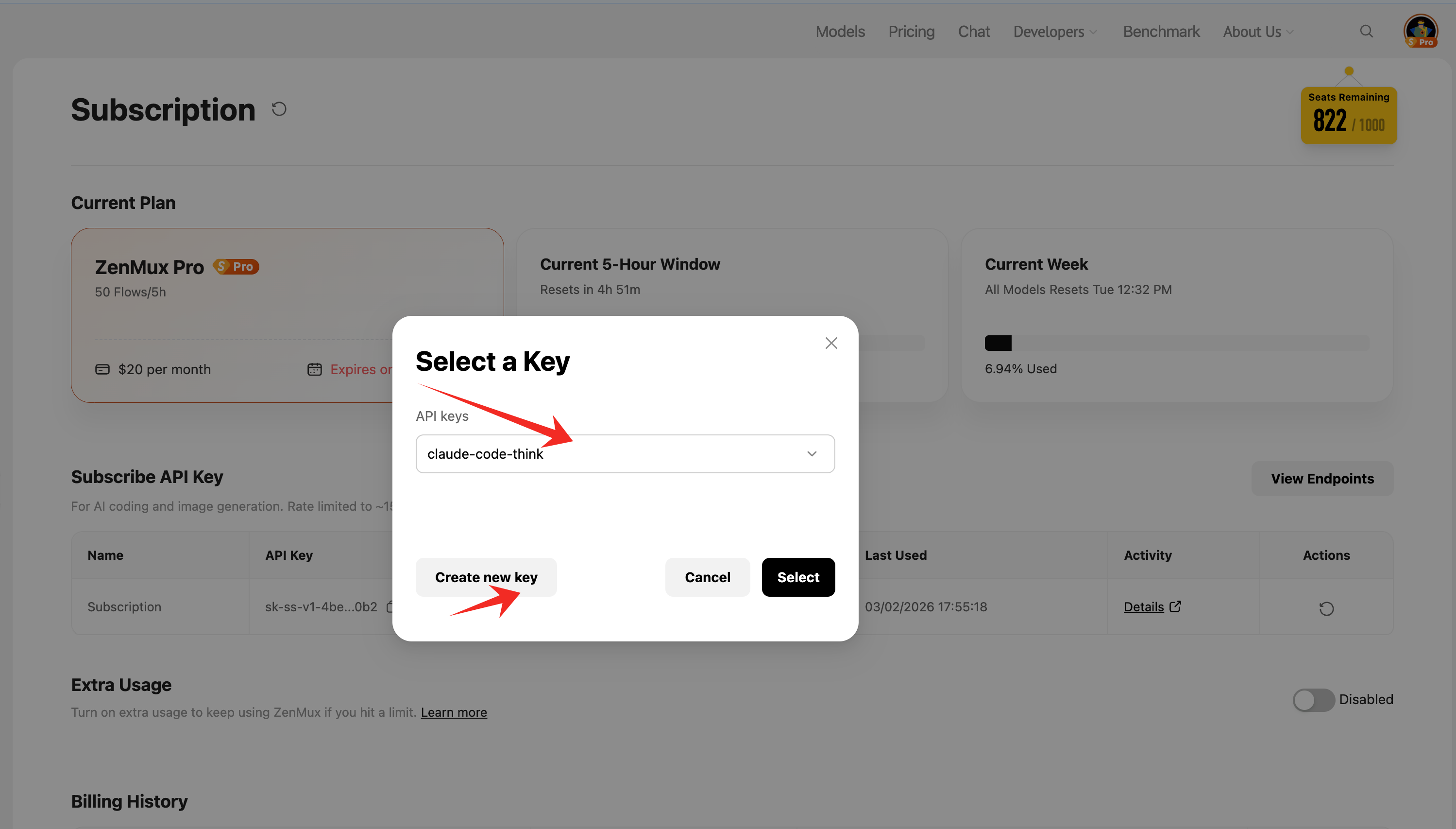
After selecting, click "Select" to confirm.
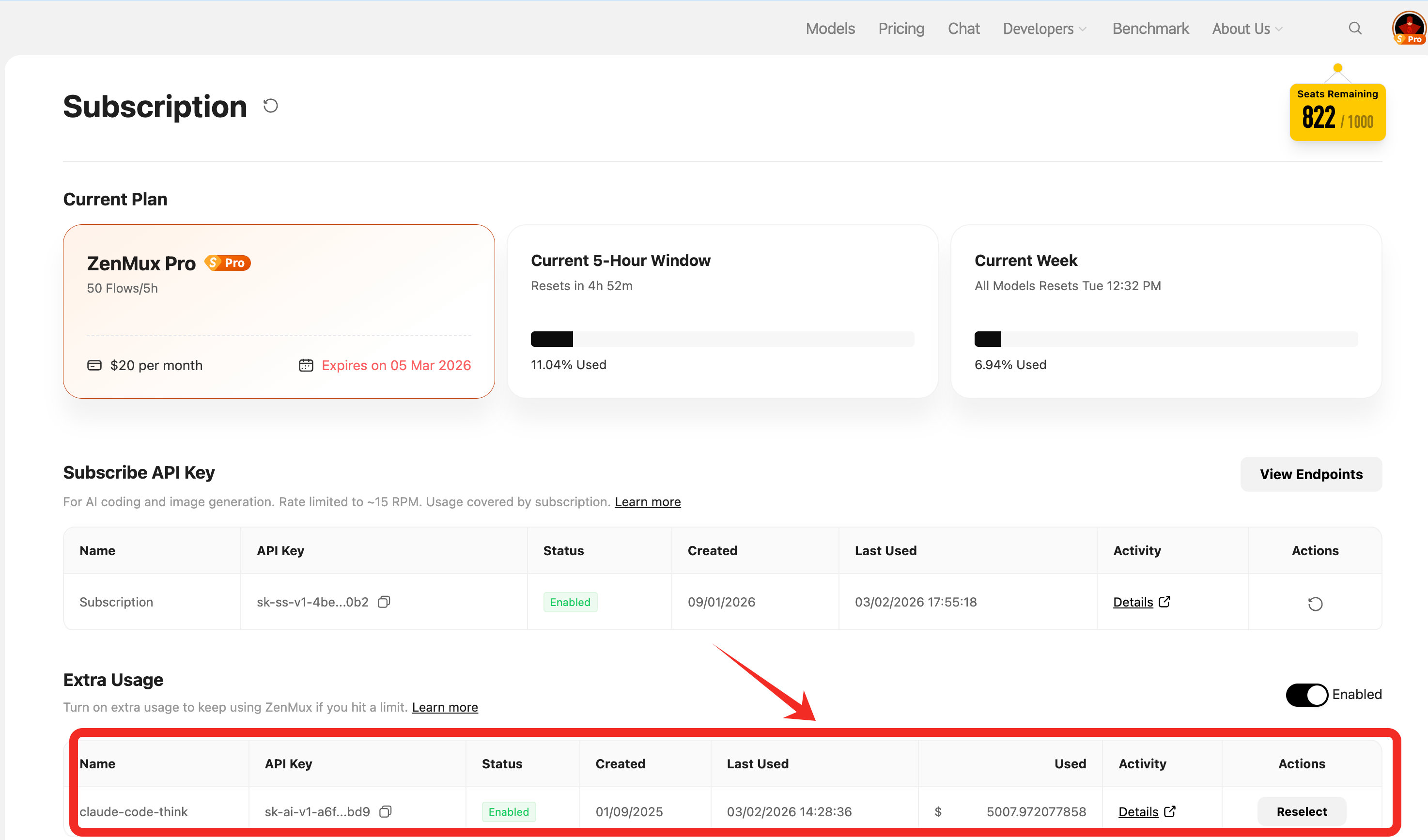
Step 3: Done
Once enabled, the page will display details of the Pay As You Go API Key you selected, including:
- API Key name and key value
- Enablement status
- Created time and last used time
- Current amount spent
- Action options (reselect another key)
How It Works
- Normal usage - Subscription quota (Flows) is used first
- Quota exhausted - When the 5-hour or weekly window quota reaches the limit, it automatically switches to the configured Pay As You Go API Key
- Usage-based billing - Calls are charged against your account balance
- Automatic recovery - When the subscription quota window resets, it automatically switches back to subscription billing
💡 Recommendations
- Make sure your Pay As You Go account has sufficient balance to avoid interruptions after switching
- You can view Extra Usage consumption and spending at any time on the Subscription Management page
- To change the backup key, click "Reselect" and choose again
⚠️ Billing reminder
After enabling Extra Usage, when your subscription quota runs out, charges will be automatically deducted from your Pay As You Go balance. Monitor your balance to avoid unexpected costs.
Step 4: Use it in developer tools
After you obtain your subscription API Key, you can use it across developer tools and applications.
Same as Pay As You Go
Subscription API Keys work exactly the same way as Pay As You Go, supporting the OpenAI SDK, Anthropic SDK, and direct HTTP calls. The only difference is that you use the subscription-specific API Key (prefixed with sk-ss-v1-), and usage is deducted from your subscription quota rather than your balance.
💡 API call example
For complete API call examples, see the Quickstart guide. Just replace the API Key in the examples with your subscription API Key.
Integrate with mainstream developer tools
Subscription API Keys can be seamlessly integrated into various AI coding tools and apps. For detailed configuration steps, see:
🔧 AI Coding Tools
- Claude Code Integration Guide - Anthropic official CLI tool
- CodeX Integration Guide - Intelligent code editor
- Cline Integration Guide - VS Code AI assistant extension
- VS Code Copilot Integration Guide - GitHub Copilot alternative
- Neovate Integration Guide - Modern AI coding tool
- OpenCode Integration Guide - Open-source AI coding assistant
💬 Knowledge Management & Chat Tools
- Cherry Studio Integration Guide - Desktop AI chat app
- Obsidian Integration Guide - Knowledge management AI plugin
- Sider Integration Guide - Browser sidebar AI assistant
🤖 AI App Platforms
- Dify Integration Guide - LLM app development platform
- Open WebUI Integration Guide - Self-hosted AI chat UI
📚 More integrations
More integration guides are continuously being added. If you need help, visit the Discord community or contact technical support.
Using Subscriptions in Studio Chat
In addition to using your subscription quota via API Key in developer tools, you can also use your subscription quota directly in the ZenMux Studio Chat web app.
Switching billing modes
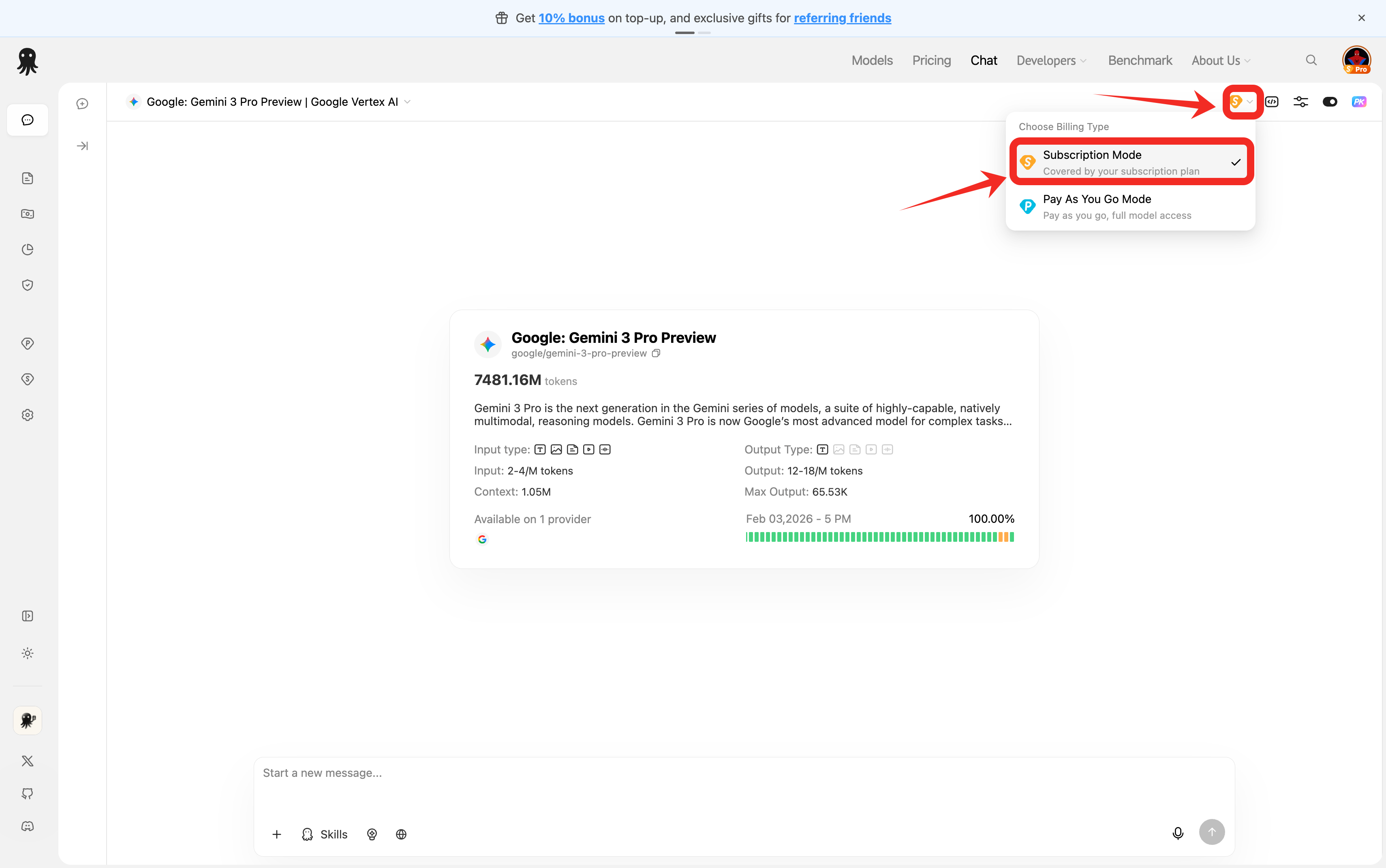
On the Studio Chat page, you can choose whether each conversation uses subscription quota or your Pay As You Go balance:
As shown, you can find the Billing Mode option in the conversation settings:
- Subscription - Uses subscription quota (Flows) and does not consume account balance
- Pay As You Go - Charges against your account balance based on actual usage
💡 Flexible switching
You can use different billing modes for different conversations. For example:
- Daily development, learning, and prototype validation → Subscription
- Production testing and commercial project validation → Pay As You Go
You can switch between the two modes anytime without affecting each other, so you can always pick the best billing method for each scenario.
⚠️ Shared quota pool
Studio Chat and API calls share the same subscription quota pool. Conversations in Studio Chat consume subscription Flows, so allocate your usage accordingly.
Upgrades & Downgrades
You can switch plans at any time during an active subscription. Upgrades (e.g., Pro → Max) take effect immediately and are billed only for the remaining time in the current cycle; downgrades take effect at the end of the current cycle and incur no additional charge.
Upgrade Proration
When you upgrade, you only pay the price difference for the time left in the current billing cycle — not a full month of the new plan.
Variables:
| Symbol | Meaning |
|---|---|
P_old | Monthly price of the current plan (USD) |
P_new | Monthly price of the target plan (USD) |
T | Total length of the current billing cycle (~1 month) |
T_rem | Time remaining until the current cycle ends |
Δ | Prorated charge due at upgrade |
Formula:
Δ = max(0, (P_new − P_old) × (T_rem / T))In plain English: proration = plan price difference × fraction of the cycle remaining. If P_new ≤ P_old (i.e., not actually an upgrade), the charge is 0.
Example: Upgrading from Pro ($20/month) to Max ($100/month) with 15 days left in a 30-day cycle:
Δ = (100 − 20) × (15 / 30) = 80 × 0.5 = $40You are charged $40 at upgrade time; the next renewal bills the full Max price ($100) as usual.
💡 Billing cycle stays anchored
Upgrading does not reset your billing cycle — the next renewal date remains the same. This avoids an "upgrade equals renewal" double-charge.
Refunds
If you're unsatisfied with your current subscription or need to cancel, you can submit a refund request from the Subscription Management page.
Refund Eligibility
- ✅ Paid subscriptions (Pro / Max / Ultra) can request a refund within 24 hours of subscribing
⚠️ Refund time limit
Refund requests must be submitted within 24 hours of successful subscription. Requests submitted after this window cannot be processed. Please confirm whether the plan meets your needs promptly after subscribing.
Refund Calculation
Refund amounts are calculated as follows:
| Item | Description |
|---|---|
| Total paid | Full amount paid in the current billing cycle |
| - Actual usage | Equivalent value of API calls consumed during the subscription |
| - Already refunded | Amount previously refunded (if any) |
| = Refundable balance | Remaining refundable amount after deducting usage and prior refunds |
| - Stripe fee (5%) | Payment platform refund processing fee |
| = Final refund amount | Amount actually returned to your payment method |
⚠️ Non-refundable cases
If the equivalent API usage value has exceeded your subscription payment amount, the subscription is not eligible for a refund.
Refund Process
Step 1: Initiate a refund

Go to the Subscription Management page and click the "Refund" button in the Billing History section.
Step 2: Confirm refund details
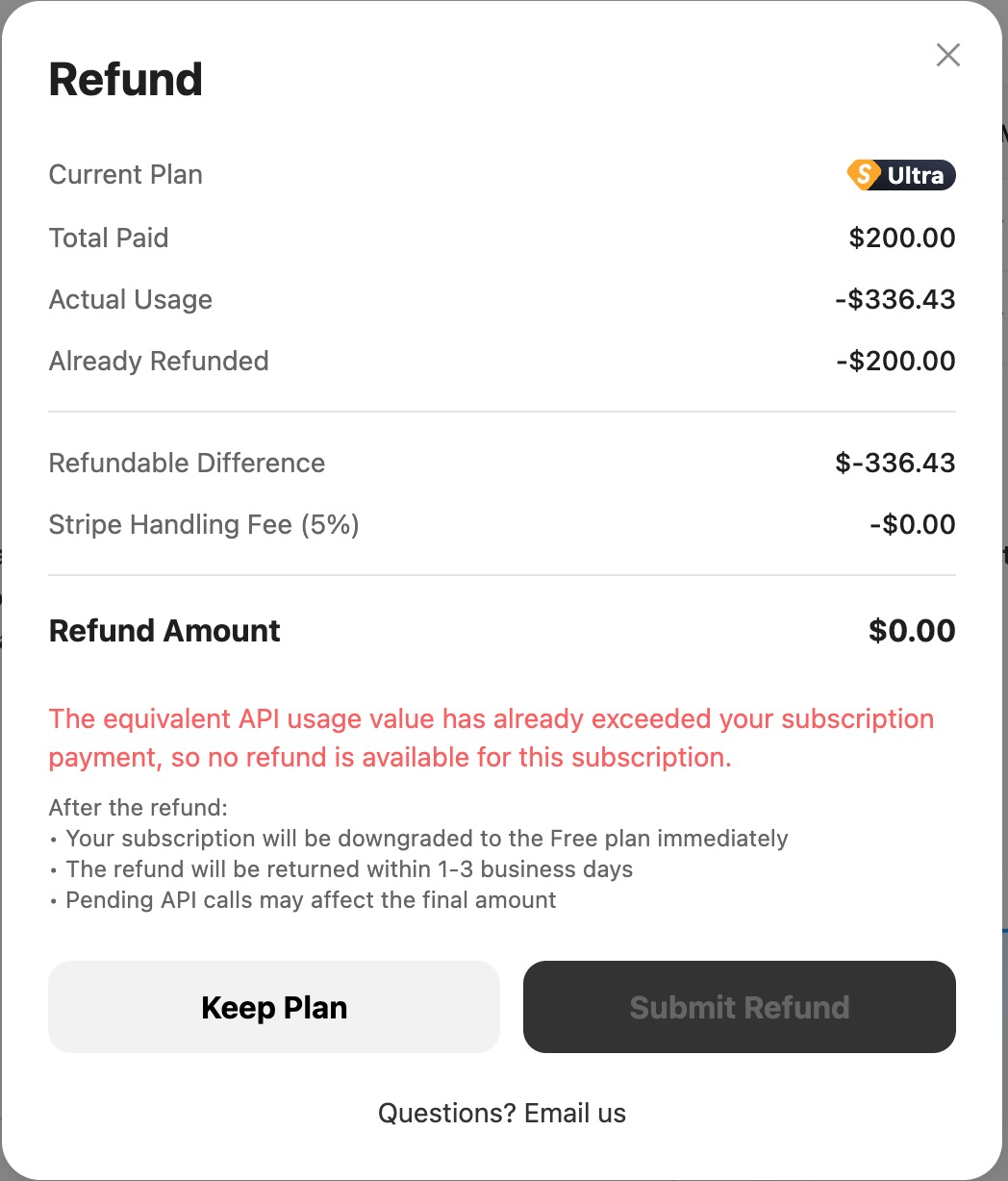
The system will display a refund preview including the total paid, actual usage, fees, and final refund amount. After confirming, click "Submit Refund".
Step 3: Wait for processing
After submitting the refund, you can check the processing status in the refund dialog:
| Status | Description |
|---|---|
| 🔵 Processing | Refund is being processed and will be returned within 1-3 business days |
| 🟢 Succeeded | Refund is complete and funds have been returned to your payment method |
| 🔴 Failed | Refund could not be processed — please contact support |
| ⚪ Canceled | Refund request has been canceled |
After Refund
Please note the following changes after a successful refund:
- Your subscription will be immediately downgraded to the Free plan
- Refunded funds will be returned to the original payment method within 1-3 business days
- Pending API calls may affect the final refund amount
💡 Need help?
If you have questions about the refund calculation or need manual assistance, email [email protected].
FAQ
What’s the difference between subscriptions and pay-as-you-go?
| Feature | Subscription (Builder Plan) | Pay-As-You-Go |
|---|---|---|
| Billing model | Fixed monthly fee | Usage-based billing |
| Best for | Personal dev, learning | Production, commercial apps |
| Cost predictability | ✅ High (fixed monthly fee) | ⚠️ Medium (varies with usage) |
| Rate limits | 10-15 RPM | Higher, customizable |
| SLA | Standard | Higher |
| Value multiplier | ✅ 1.50-2.40x | Standard API pricing |
When does the quota reset?
- 5-hour window: Uses a rolling window mechanism. Metering starts when you send a request and resets every 5 hours.
- Weekly limit: Metering starts when you send a request and resets every 7 days.
You can view remaining quota and reset times in real time on the Subscription Management page.
Can I use multiple plans at the same time?
No. One account can only have one active subscription plan at a time. If you need higher limits, upgrade to Max or Ultra.
Next Steps
Now that you understand how the Builder Plan subscription works, you can:
- 📚 Read the Quickstart guide to learn detailed API usage
- 🔧 Check Best Practices to integrate your subscription API Key into developer tools
- 💰 Learn about the Pay-as-you-go plan for production billing
- 📊 Visit the Usage Analytics page to monitor subscription quota consumption in real time
- 💵 Review Cost Analysis to learn how to optimize costs
Contact Us
If you run into any issues, feel free to reach out via:
- Official website: https://zenmux.ai
- Support email: [email protected]
- Business email: [email protected]
- Twitter: @ZenMuxAI
- Discord: https://discord.gg/vHZZzj84Bm
For more contact options and details, visit our Contact page.